



Facebook has rebuilt its front door and its profile pages so many times that several versions now feel like different websites. The earliest screens are narrow college directories made from blue rules, small portraits and long lists of personal facts. By the end of this gallery, one enormous cover photograph carries the page while the old directory information has retreated into boxes and tabs.
That change is the story here. Facebook grew from a Harvard-only site into a place for friends, games, public figures, brands and political campaigns, and the interface had to find room for every one of them. Look closely at the screenshots. The familiar blue survives almost everything else.
Facemash (2003)
Before Facebook there was Facemash, a short-lived Harvard site Mark Zuckerberg built in late October 2003. One caveat about the image below, because it is the only one in this gallery that is not a capture of a real page. No screenshot of Facemash appears to have survived, so what you are looking at is the recreation built for The Social Network, filmed off a monitor in 2010. You can see a hand at either edge of the frame. Treat it as a reconstruction.
It does match the contemporary descriptions, and it states the idea with all the subtlety of a dorm-room prank. A line across the top reads Were we let in for our looks? No. Will we be judged on them? Yes. Underneath sit two student photographs with an OR between them and the question Who's Hotter? Click to Choose. House names run along the bottom, Adams through Pfoho, so visitors could narrow the contest.
The photographs had been taken from Harvard's online House directories without permission. According to The Harvard Crimson's contemporary report, Zuckerberg took the site down after criticism over privacy and the ranking of students by attractiveness. Facemash was not an early version of Facebook, but it established two things that would matter very soon: people would spend a remarkable amount of time looking at other people, and a simple page could spread across campus overnight.
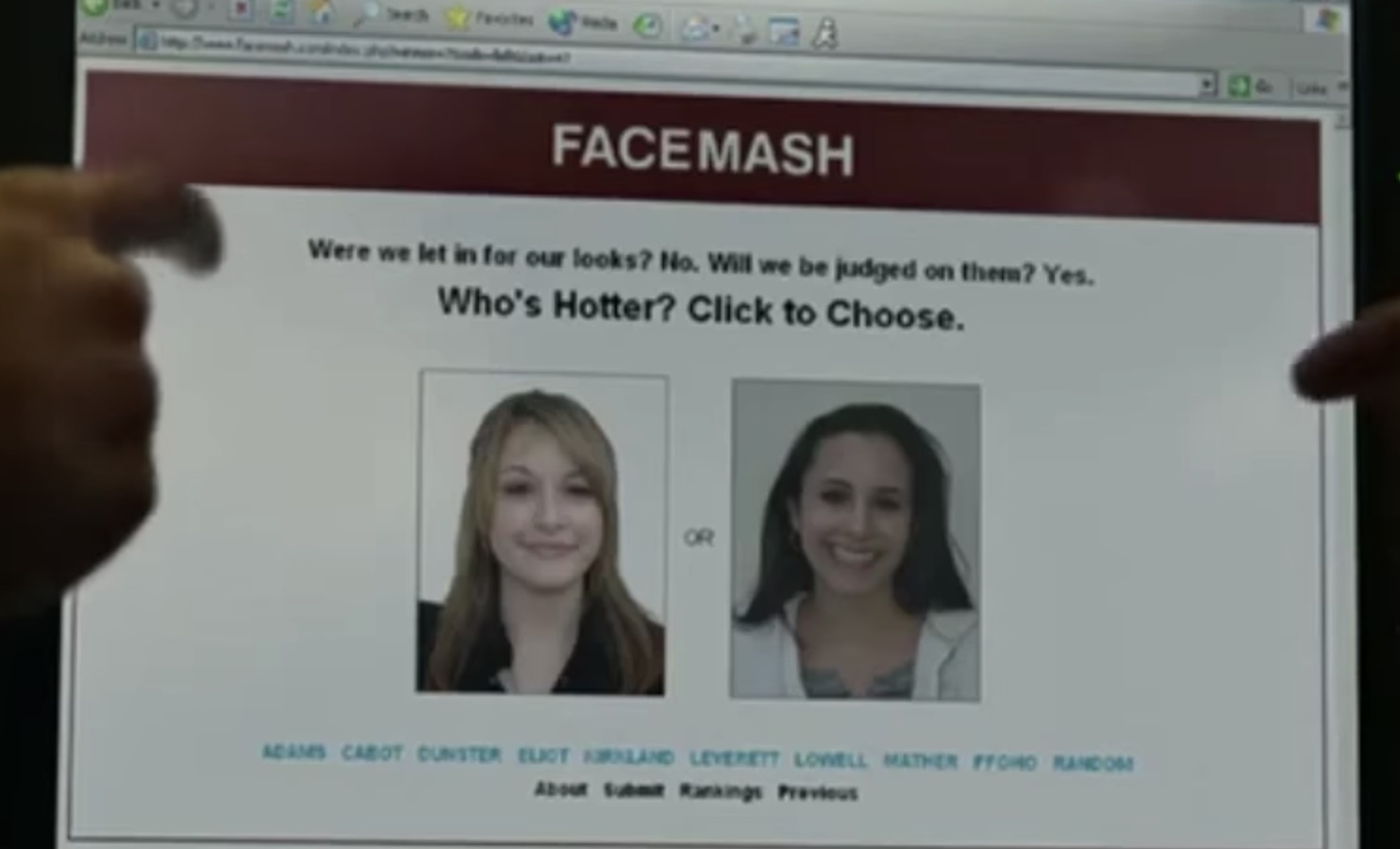
Facemash, recreated for the film The Social Network (2010)
Source: medium.com
"The Facebook" at Harvard (2004)
Thefacebook.com went live for Harvard students on February 4, 2004. The first homepage looks almost homemade because it was. A pixelated face peers out of a field of ones and zeroes, the logo sits inside square brackets and the entire service fits behind three links: login, register and about. The central panel describes an online directory and lists four things to do: search for people at your school, find classmates, look through friends' friends and see a visualization of your social network.
That modest pitch caught on quickly. A Harvard Crimson retrospective reports 650 registrations in the first 24 hours and 4,300 within two weeks. The About page is even more revealing than the homepage. Under The People, Zuckerberg calls himself "Founder, Master and Commander, Enemy of the State." Eduardo Saverin handles "Business Stuff, Corporate Stuff, Brazilian Affairs." Dustin Moskovitz is the "No Longer Expendable Programmer, Paid Assassin," Andrew McCollum gets "Graphic Art, General Rockstar" and Chris Hughes is simply "The Secret Weapon." The jobs page is not joking at all. It asks senior engineers whether they can build systems scalable to millions of people, and lists PHP, Apache, SQL, Linux and MySQL among the skills. Ambition was not in short supply.
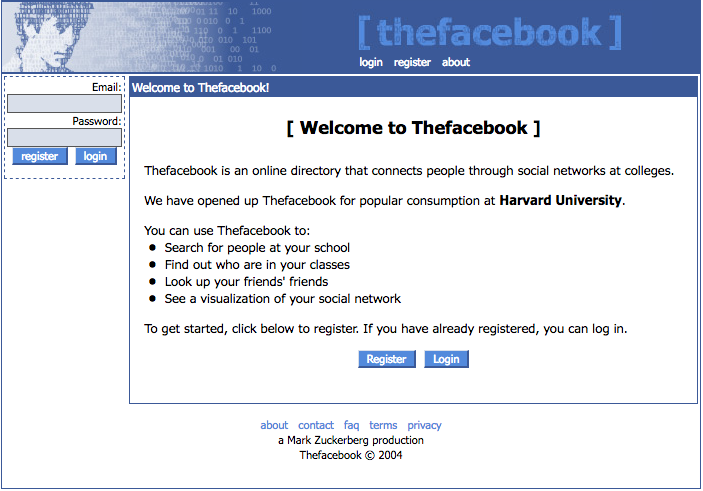
"The Facebook" homepage/login page (2004)
Source: web.archive.org
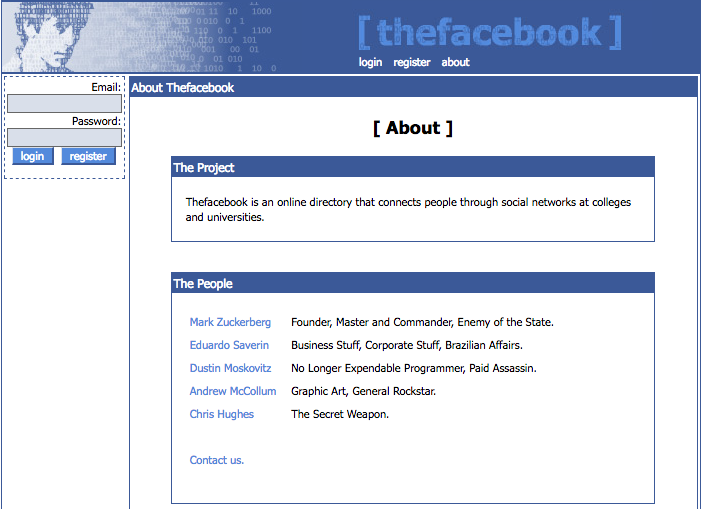
"The Facebook" About page (note the snarky titles) (2004)
Source: web.archive.org
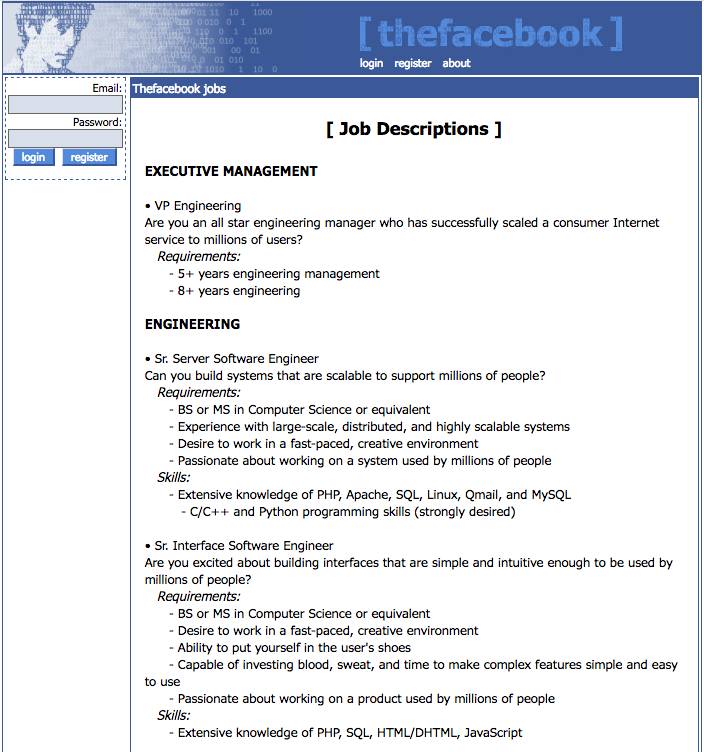
"The Facebook" jobs/hiring page (2004)
Source: web.archive.org
"The Facebook" School Expansion and Profiles (2004-2005)
The school list on the next homepage shows how quickly a Harvard directory became a network of networks. Brown, Columbia, Cornell, Dartmouth, MIT, Stanford and Yale crowd the center of the page alongside about fifty others, running alphabetically down to Wesleyan and Williams. The pace was extraordinary. By June 2004, The Crimson counted 34 campuses and more than 150,000 members, and this capture already lists close to sixty schools. Access still depended on the right school email address. As the page says, your facebook is limited to your own college or university, which made each campus a defined neighborhood inside the larger site.
The 2005 profile is basically a questionnaire made public. The left holds the photograph, mutual friends and an ad; the right records school, residence, relationship status, political views, interests, favorite music and favorite movies. Brian's residence is a dorm room number, printed in full. A box below his picture reports that he is currently logged in from a non-residential location, which is a remarkable thing for a website to volunteer about somebody. The group page uses the same stack of blue title bars for its description, officers, recent discussion and related groups, and its officers are a co-founder, a Prime Minister and a minister of defense. The joke titles had escaped the About page. Before Facebook became a river of posts, it was a place to inspect a person or group one labeled field at a time.
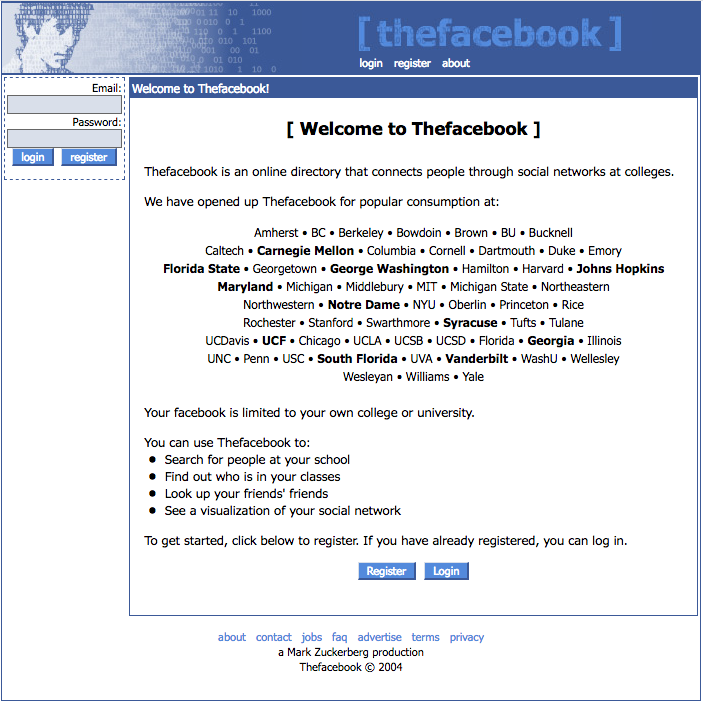
"The Facebook" login page with schools added (2004)
Source: web.archive.org
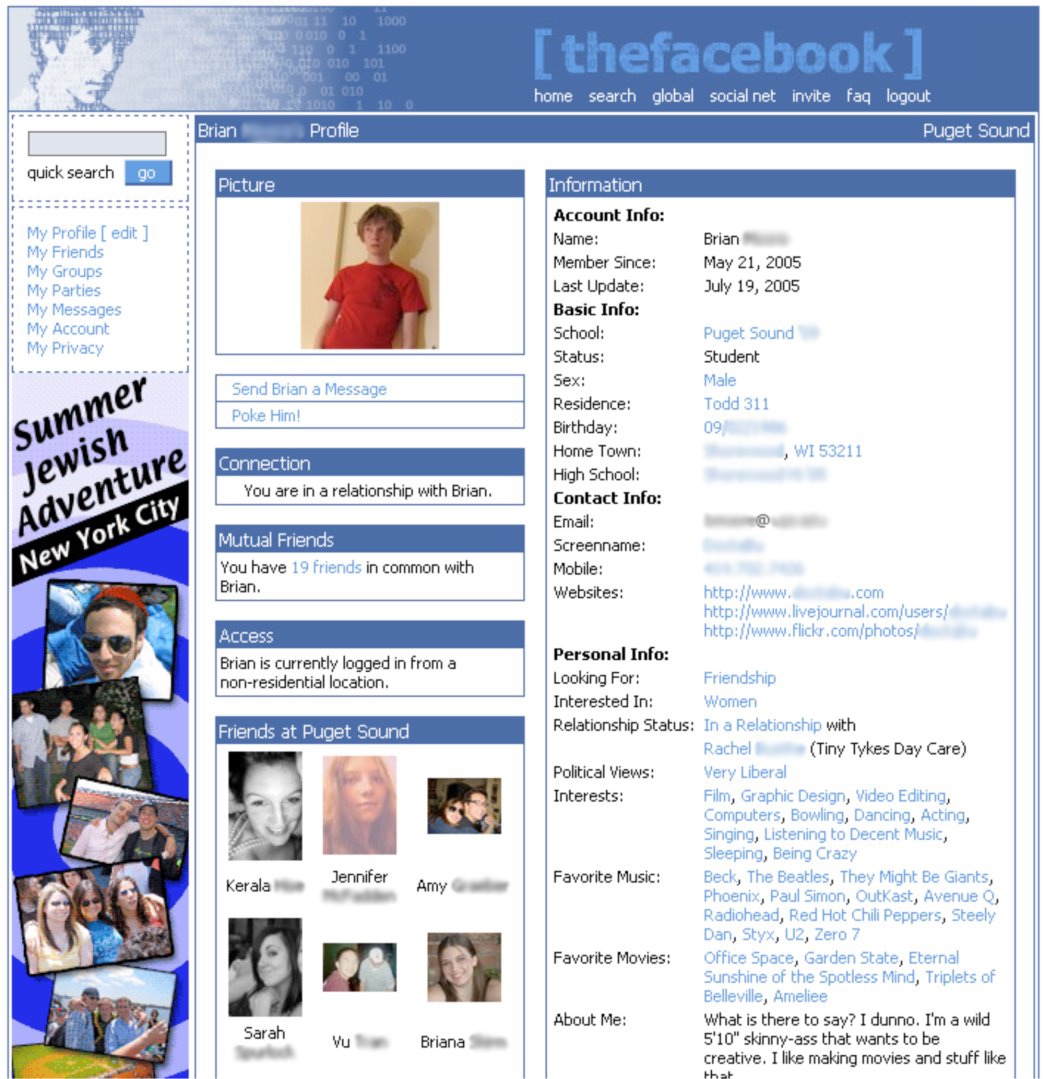
"The Facebook" profile page (2005)
Source: time.com
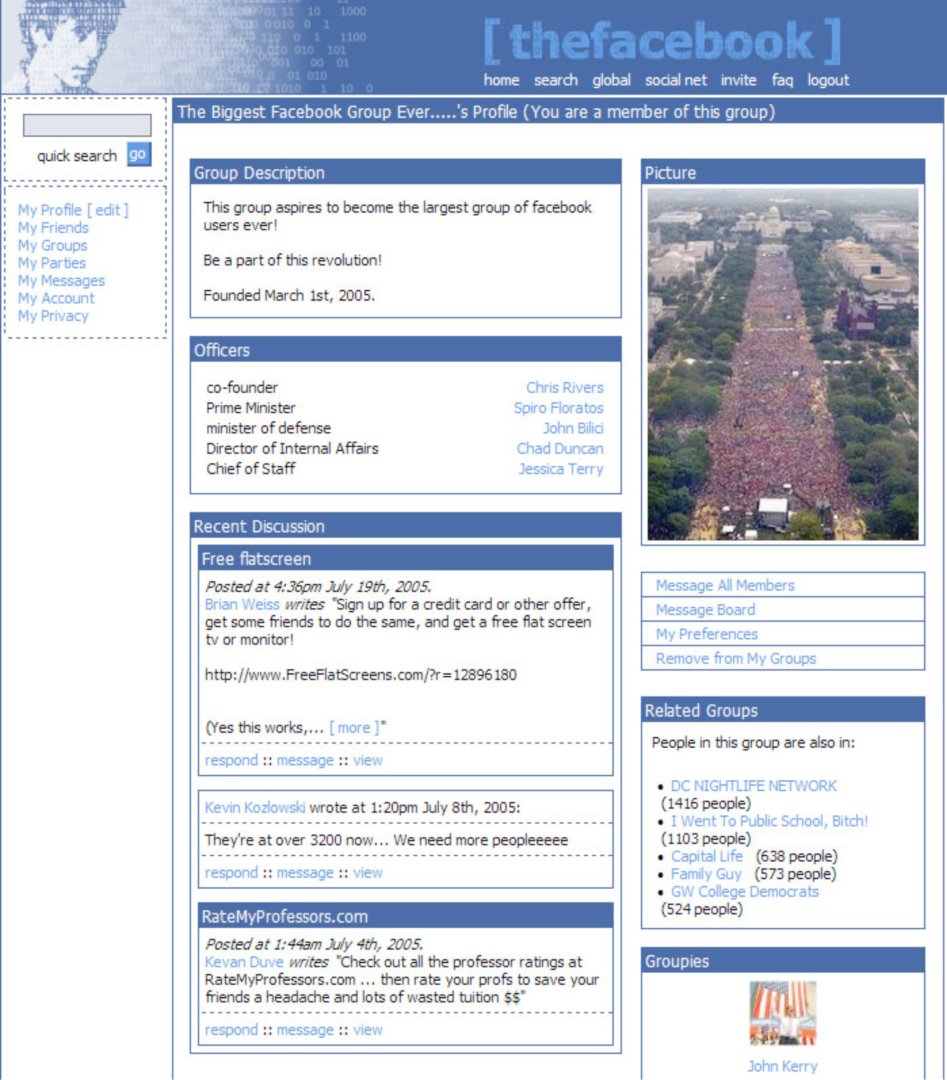
"The Facebook" group page (2005)
Source: time.com
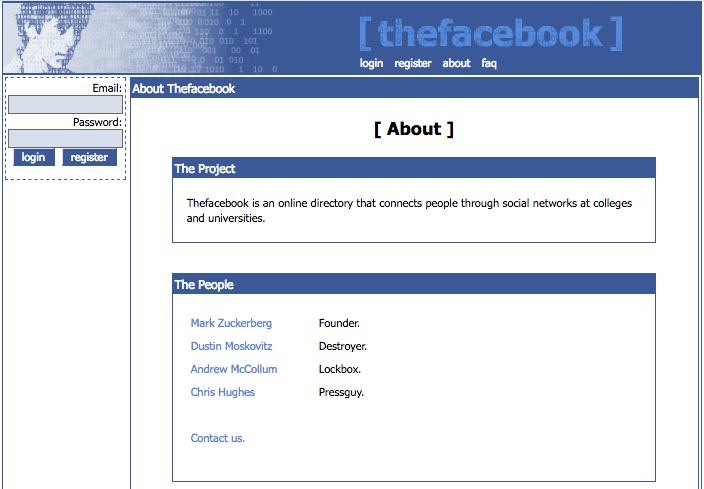
"The Facebook" About page, now four names and shorter titles (2005)
Source: web.archive.org
Facebook Redesigns and Drops the "The" (2005)
The name finally caught up with what people were already calling the site. After the company acquired facebook.com in 2005, thefacebook.com officially dropped the and became Facebook. The redesigned wordmark below is heavier and cleaner, set in white on the same muted blue. The small square "f" gave the growing service an icon that could travel where the full name could not.
The redesigned profile loosens the old boxed-in layout. A search field and personal navigation occupy the left rail, while a large portrait and the member's basic facts take over the center. The visible Mini-Feed identifies this particular profile capture as 2006 or later, though it has often circulated with a 2005 date. Facebook still asks for favorite bands and movies, but the shape of the page is moving away from a static directory and toward a running account of what somebody has done.

Logo redesign (2005)
Source: hlskc.com
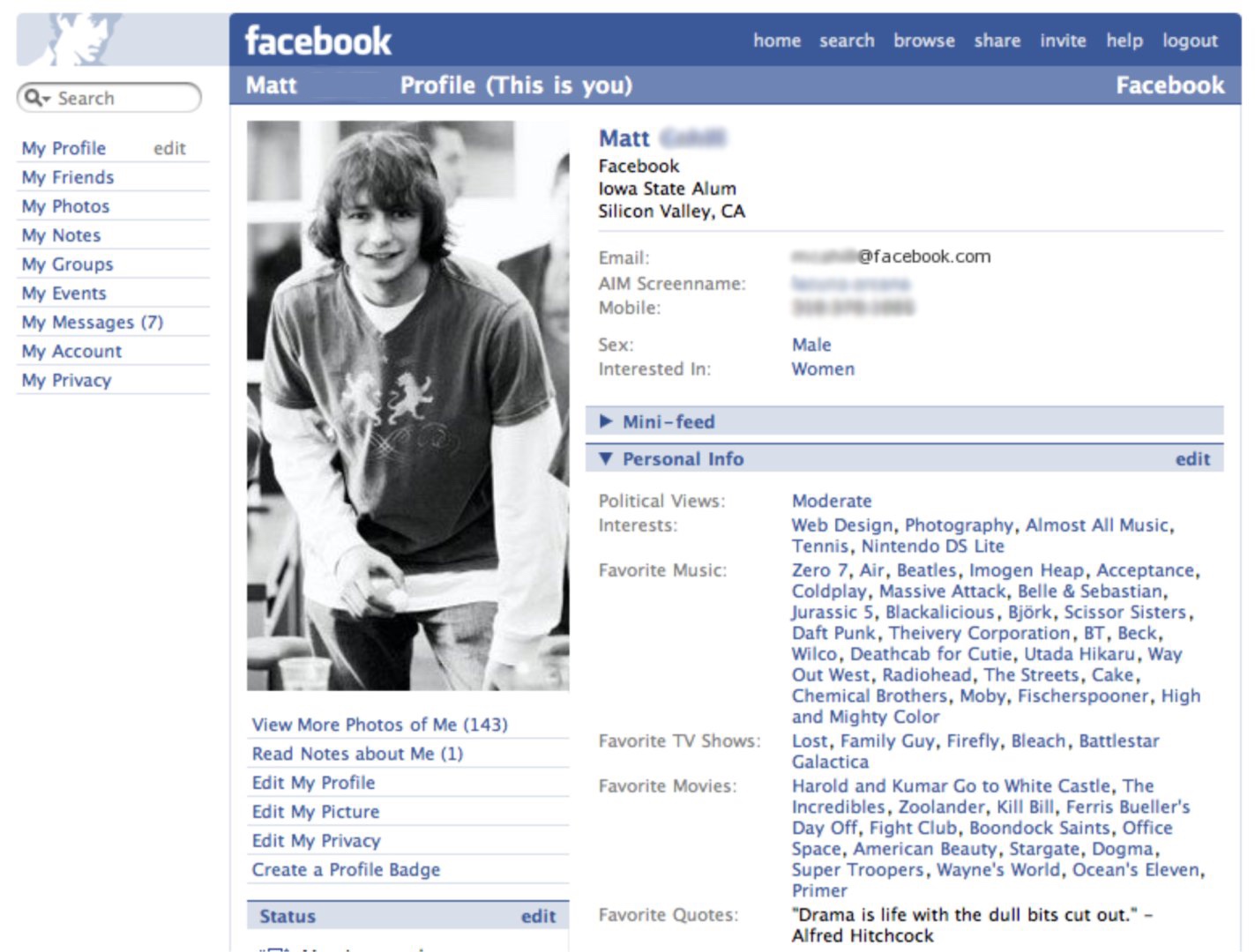
Profile page after the removal of "The," with Mini-Feed (2006)
Source: time.com

Facebook F icon (2005)
Source: logospng.com
Doubling Down on What Works (2006-2007)
The 2006 profile makes the turn explicit. Wayne's basic facts have shrunk to five lines, and the space they used to occupy now belongs to a Mini-Feed announcing that it is displaying 10 stories: an event he plans to attend, a video he posted, new photos, two new friendships. His portrait, status, groups and posted items sit in a column to the left. A profile is becoming something to revisit, because it changes whenever its owner posts, joins a group or adds a photograph.
Facebook made that behavior the center of the whole service when News Feed and Mini-Feed launched on September 5, 2006. The sudden summary of friends' activity prompted an immediate privacy backlash, and three days later Facebook announced additional controls. On September 26 it opened registration to anyone with a valid email address.
The 2007 profile is flatter and calmer. Core links run across the top, feature links sit on the left and recent activity appears directly under the member's facts. Notice the line under Amy's name: "is excited about the new redesign." Status updates still forced the user to speak in the third person. The Photos page alongside it is almost startlingly plain. A header reading Photos 1 - 20 out of 24 sits over a bare grid of thumbnails and two small page numbers. No captions, no albums, nothing to press. Photography was already becoming Facebook's natural language, and the interface had barely noticed.
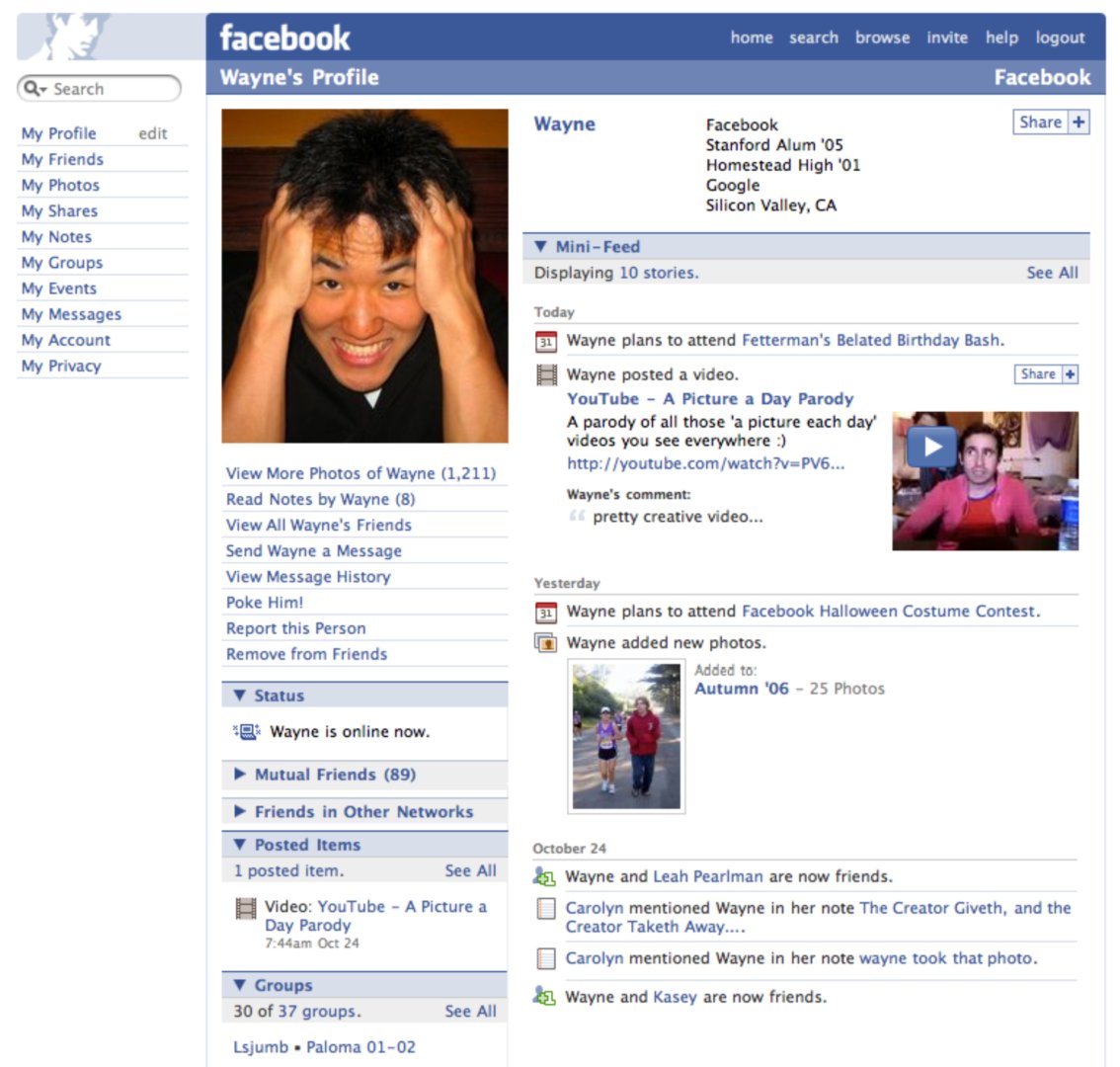
Facebook profile page (2006)
Source: time.com
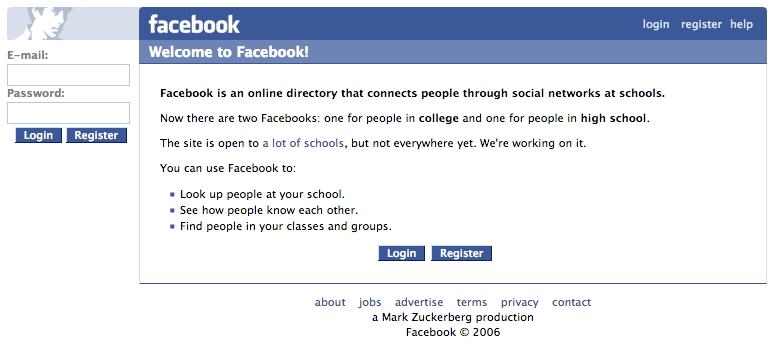
Facebook login homepage with "The" removed (2006)
Source: web.archive.org
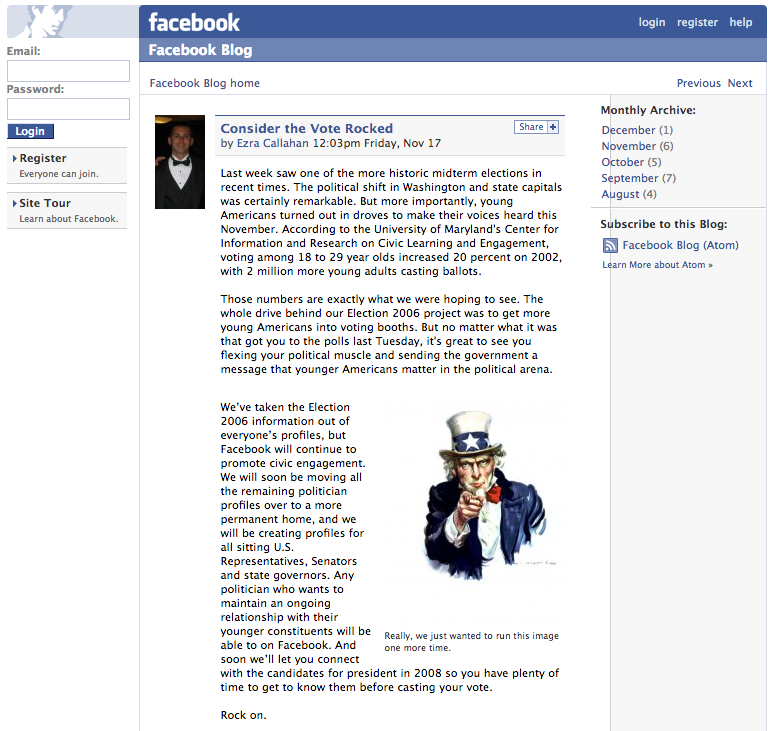
Facebook blog post about youth voting in the 2006 U.S. election/Source: web.archive.org
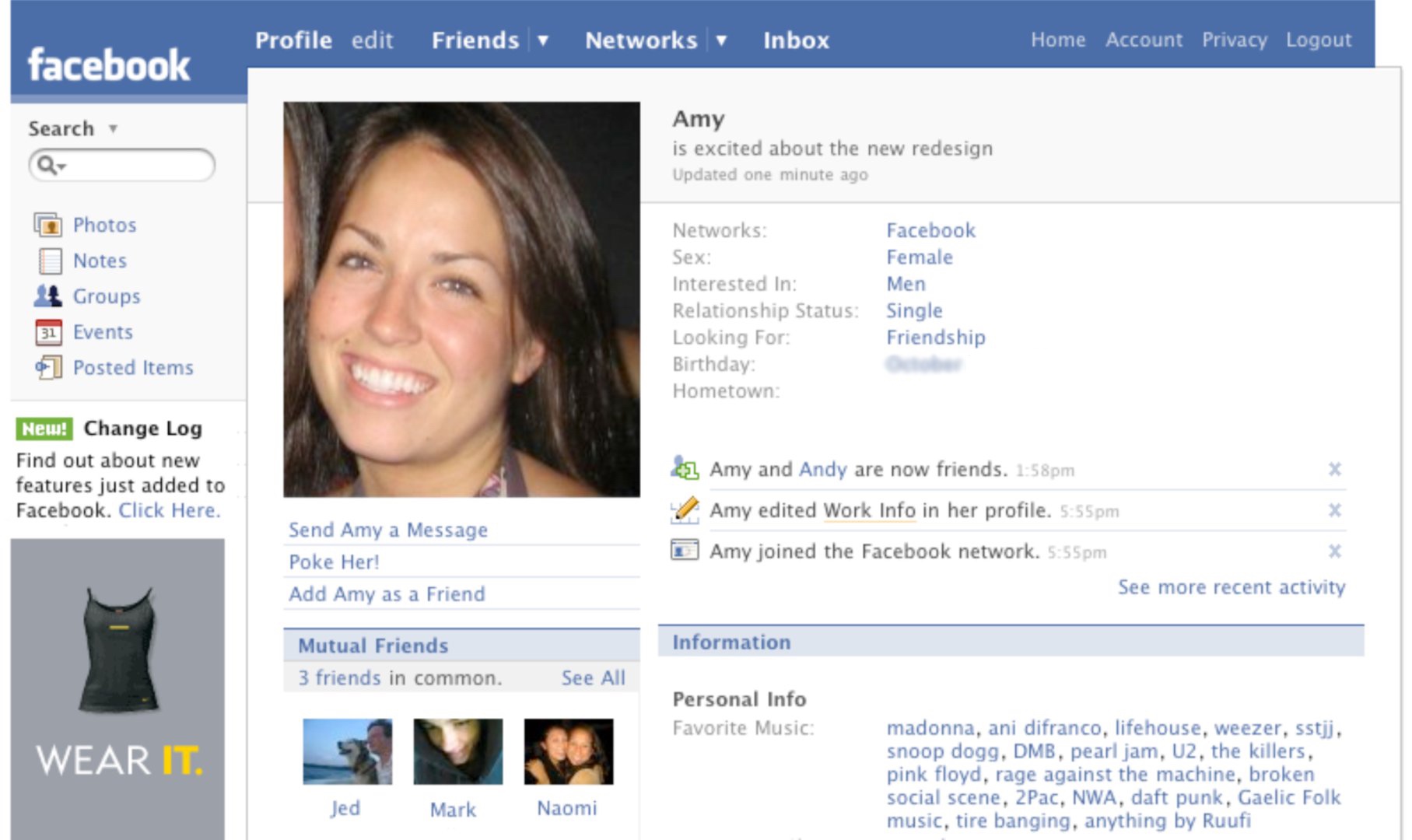
Facebook profile page (2007)
Source: time.com
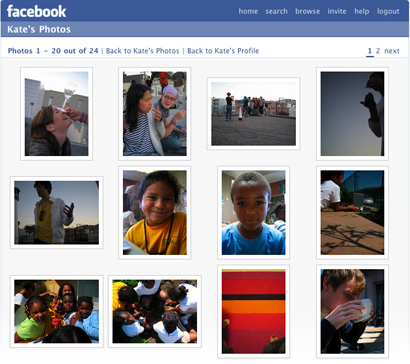
Facebook photos page (2007)
Source: web.archive.org
Profile Redesign and The Wall (2008)
Facebook's July 2008 redesign put the Wall and its stream of stories at the center of the profile. The first capture below is the "new Facebook" with Jason's Wall selected. His portrait and basic information have moved to a left rail, leaving one broad column for status updates, comments and friend activity. The prompt asks, "What are you doing right now?"
Christina's profile in the second capture shows the same ideas on a wider canvas. A publisher for writing, sharing links, posting photos and recording video sits above the Wall. Tabs labeled Wall, Info, Photos and Boxes divide the rest. Facebook said the new design was meant to highlight recent information and simplify a profile that had accumulated both Facebook features and third-party applications. Even here, advertisements occupy their own rail on the right. The three-column Facebook silhouette had arrived.
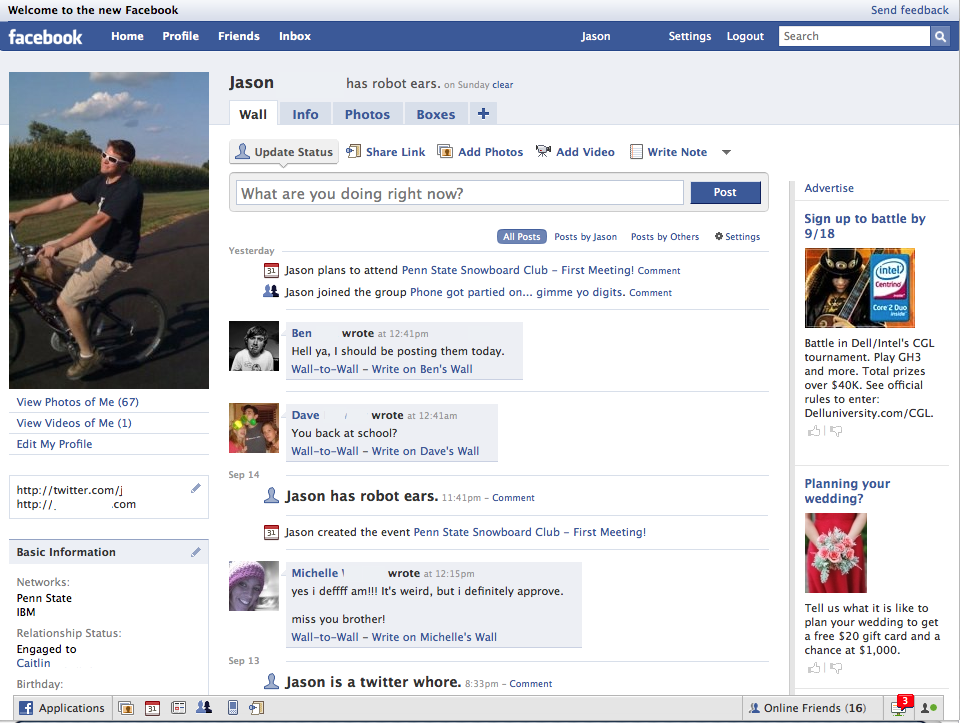
Facebook profile page (2008)
Source: time.com
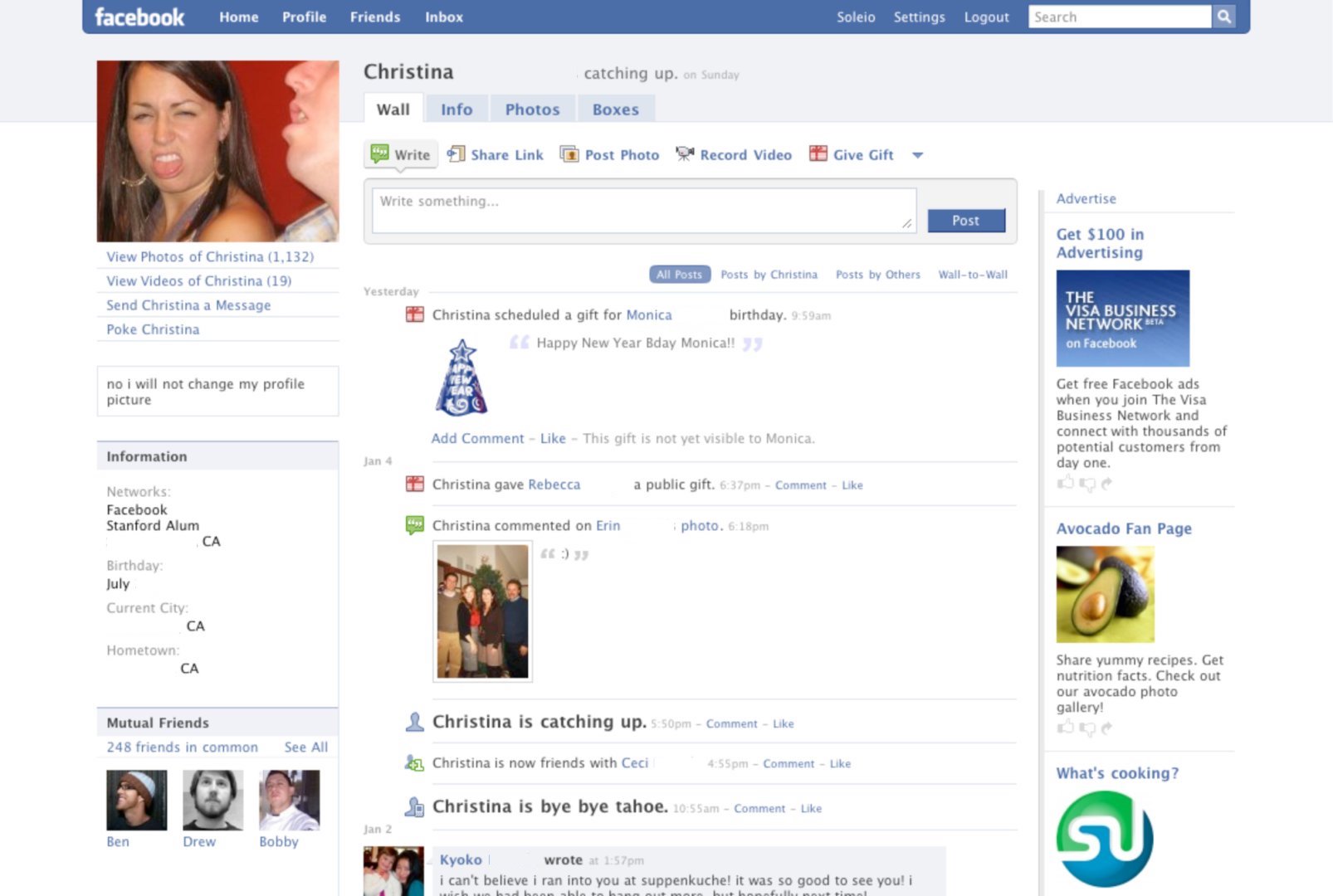
Facebook profile page (2008)
Source: time.com
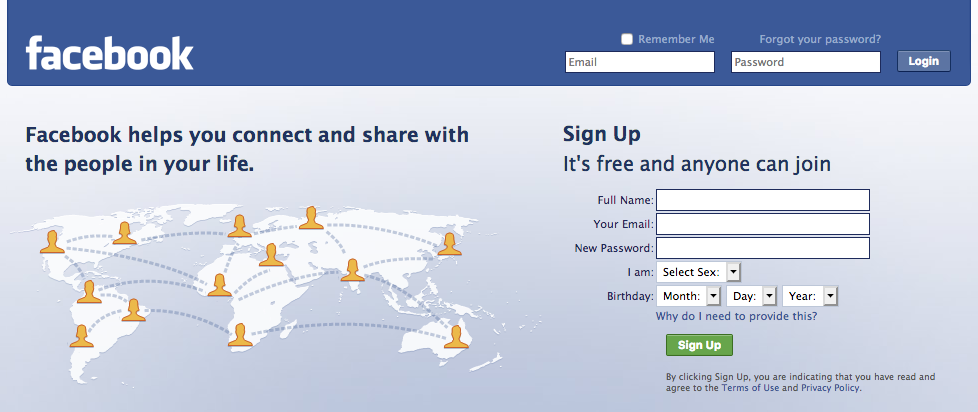
Facebook new login page (2008)
Source: web.archive.org
Profile Pages (2009)
The 2009 desktop profile tightens that formula, and this one belongs to Mark Zuckerberg. His Wall fills the center, with a publisher box at the top and activity and photographs below. His portrait and an Information card hold the left, ads hold the right, and there is very little empty space anywhere. Every column is asking for a click.
The best detail is a green tooltip Facebook has popped over the publisher: New Privacy Control, "Use this new control to choose who can see each post you publish." The audience selector beside it reads Friends and Networks. Choosing an audience per post was new enough in 2009 to need a tutorial bubble, and Facebook was demonstrating it on the founder's own page.
The second capture is not a phone screen at all. It is the desktop Page for the Facebook for Android application, seen logged out, carrying the same Wall, Info, Reviews, Video and Discussions tabs as any other Page. A handset photograph, a QR code and an oversized green mascot fill the left rail, above a rating of 2.8 out of 5 from 702 reviews and a count of 231,556 monthly active users. The Wall below is people arguing about Droids and HTC handsets. The website was still where Facebook explained itself, even when the subject was leaving the computer behind.
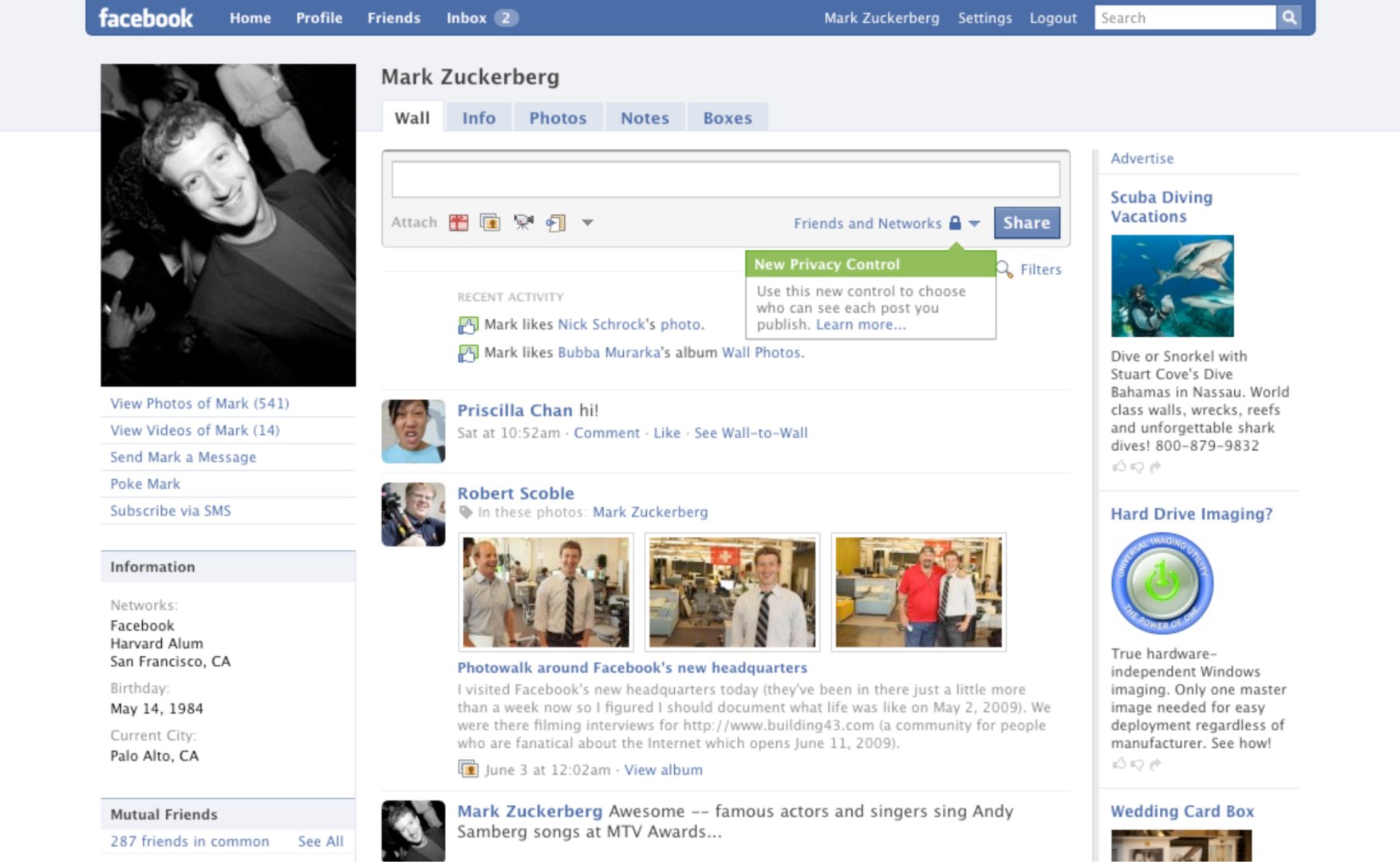
Facebook profile page (2009)
Source: time.com
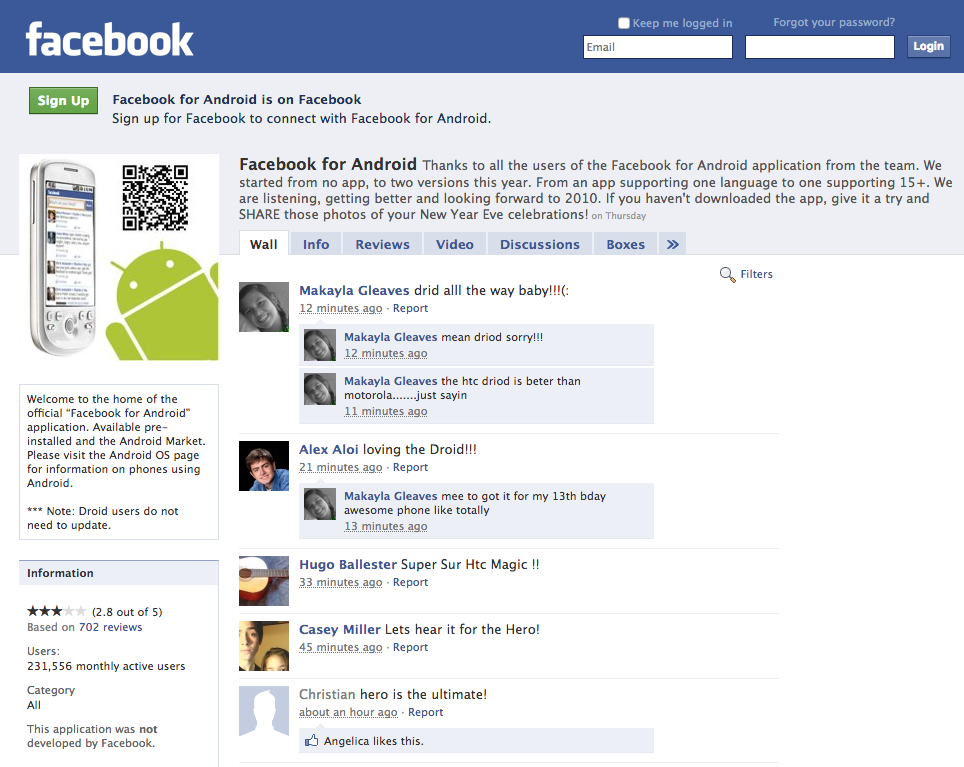
Page for the Facebook for Android app (2009)
Source: web.archive.org
Facebook Platform Apps (2009)
Facebook Platform opened the site to outside developers in May 2007. Applications could live inside Facebook, place boxes on profiles and spread through News Feed. Facebook's launch announcement described more than 65 developer partners and 85 applications. Two years later, FarmVille demonstrated exactly how large that opportunity could become.
The screenshot barely resembles a social-network profile. A bright cartoon farm occupies most of the page, with coins, cash and neighbor invitations across the top. Facebook's blue navigation and an ad column are still wrapped around it, though, and the bottom bar carries the user's friends into the game. Look at that ad column: the ads are in Vietnamese. By this point the farm and the advertising around it both reached well past the United States. Zynga says FarmVille launched on June 19, 2009 and reached one million daily players in its first week. For a while, tending virtual crops was one of the things people went to Facebook to do.

FarmVille by Zynga (2009)
Source: terabytetv
Facebook Questions and UK Politics (2010)
By 2010 Facebook was trying to organize knowledge as well as relationships. The Questions landing page promises three things in illustrated panels: ask any question, explore any topic and get quality answers. Recent questions appear on the right, asking after favorite guitar solos, the best Canon lens for outdoor portraits, summer beach reading and the best apps for Android. A box on the left admits how early this is: Questions will reach everyone in the US within the next few weeks, so please check back. The first public beta began rolling out in July 2010. This version invited answers from across Facebook, a much wider audience than a status update to friends.
The Democracy UK page puts that same machinery to political use. Big Ben becomes the profile picture, and the tabs read Wall, Info, Discussions, Digital Debates, Events and Polls. The capture comes from just after the May 2010 general election, so the Wall is not campaigning, it is reporting: the Queen's Speech, George Osborne's spending cuts, David Cameron's first talks with European leaders, each post linking out to the BBC or number10.gov.uk. The comment counts are the real story. One post has 789 comments, the next has 1,571. Down the left rail sit 278,064 likes and a row of favorite Pages that includes the Conservatives, The Telegraph and Sky News. The social directory had become public infrastructure, with an argument running underneath every headline.
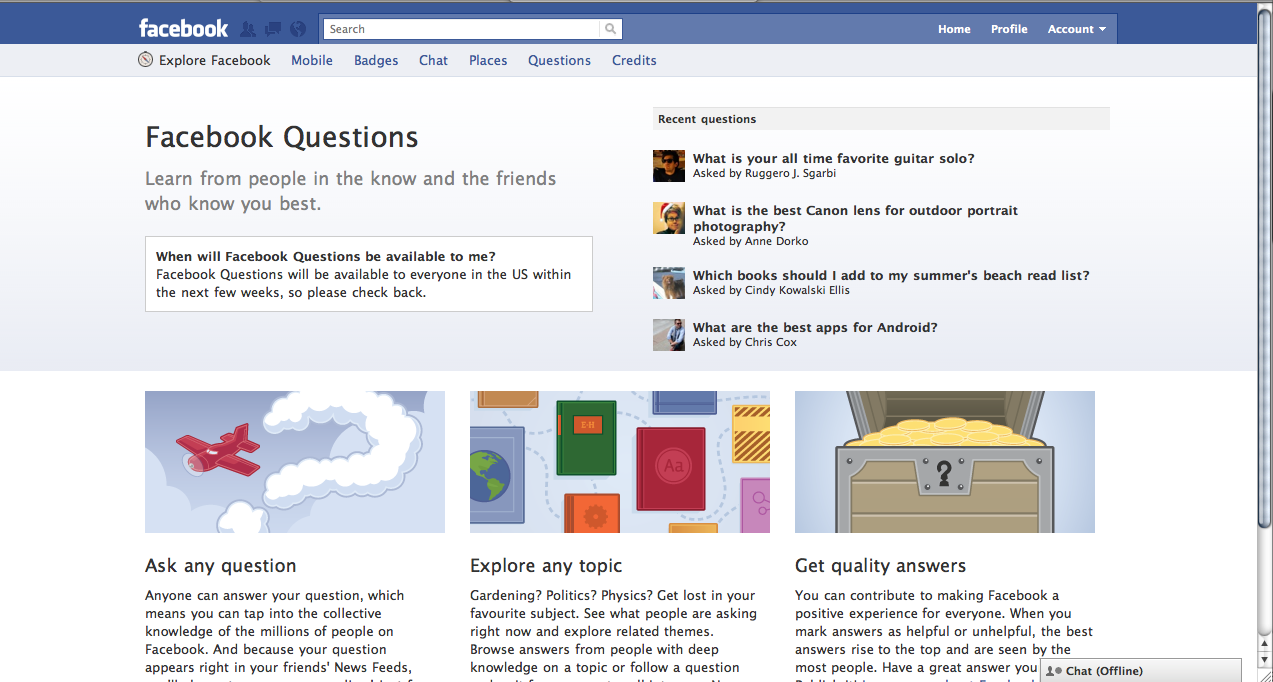
Facebook Questions (2010)
Source: vermeiretim.com
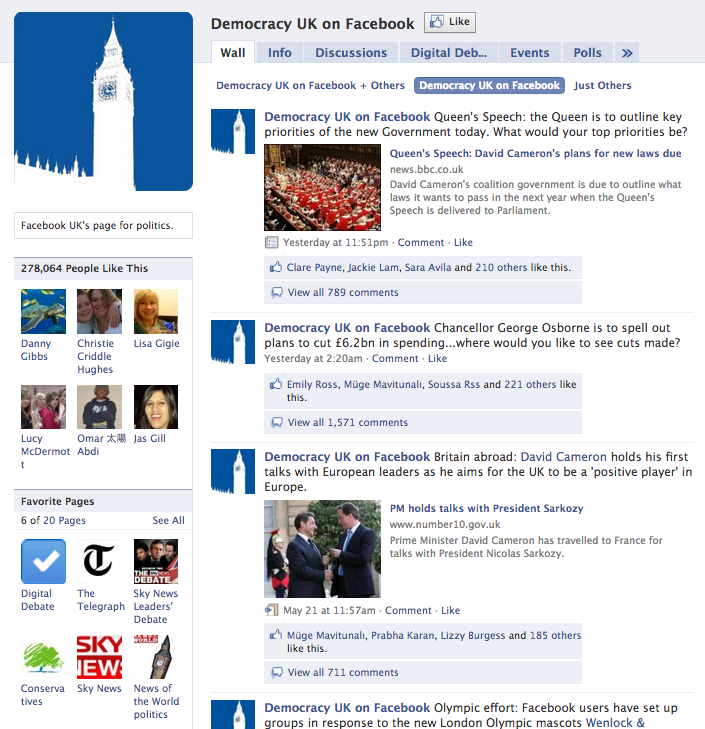
Democracy UK on Facebook (2010)
Source: web.archive.org
Two-Column Timeline Redesign (2011)
Timeline was Facebook's largest rethink of the profile so far. Announced at the f8 conference in September 2011, it treated a person's accumulated posts as a life story instead of an endlessly disappearing stack of recent updates. Facebook's own introduction called out the giant photograph at the top as the first thing people would notice. That cover image dominates Scott's page below, with a smaller profile portrait overlapping it.
Underneath, the story splits into two columns arranged around a central line. Boxes for friends, maps and recent activity compete with individual posts, while a list of years on the right offers a shortcut back through the archive. The page is busy, but the organizing idea is easy to read: the profile now has a past. Facebook described the wider, more visual design in its Timeline announcement.
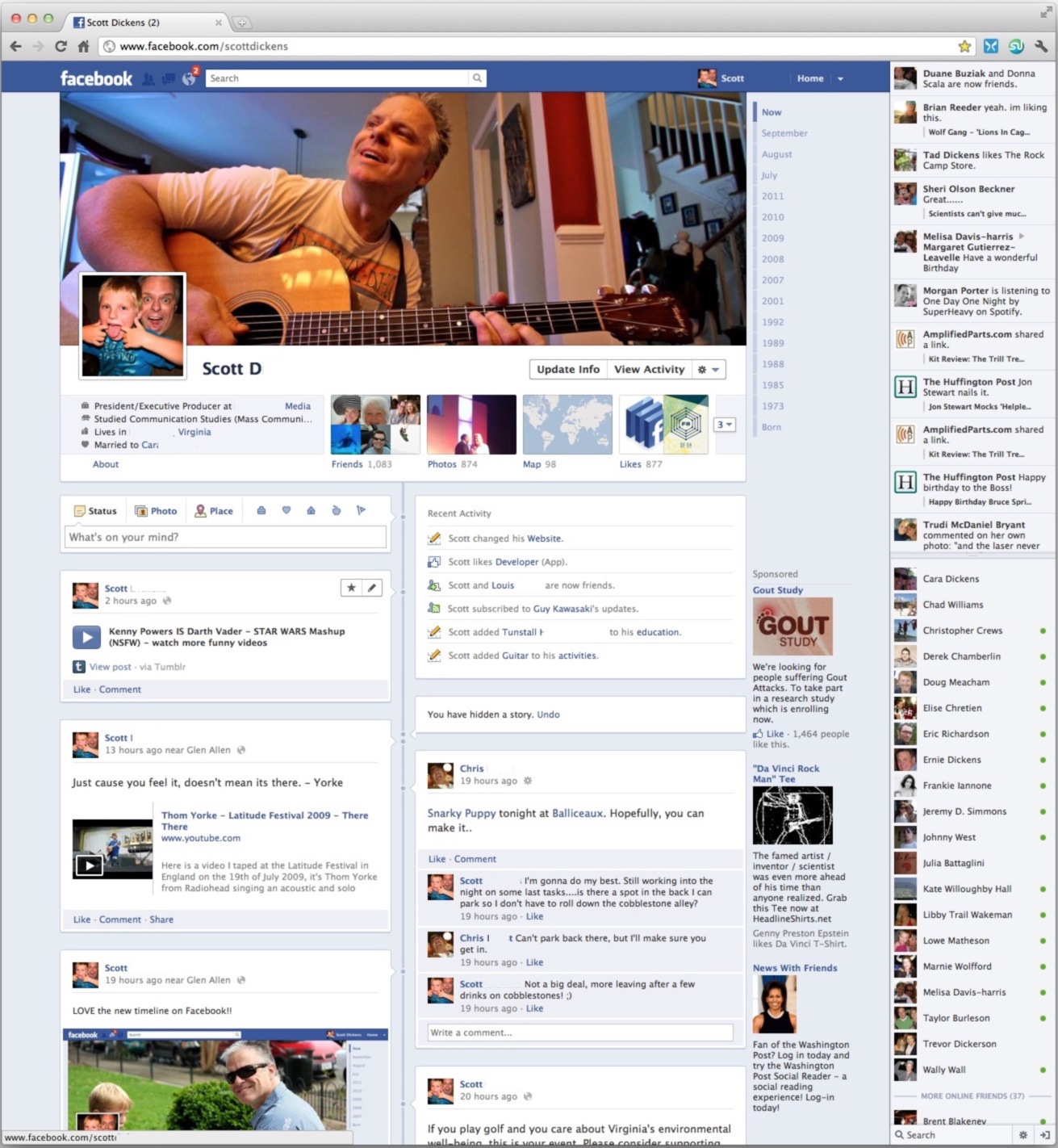
Facebook Timeline profile redesign (2011)
Source: rocketpopmedia.com
One Billion People and the Chairs Ad (2012)
In October 2012, Facebook announced that more than one billion people were using the service each month. Its celebratory brand film compared Facebook to chairs, doorbells, airplanes, bridges and a great nation. The idea was that all of them bring people together. Facebook's homepage turned the film into a large still: one red chair alone in a dark forest, a play button in the middle and the line Things that connect us underneath.
It is a remarkably solemn advertisement for the website that gave the world pokes and FarmVille requests. You can watch the Chairs are like Facebook film or read Facebook's one-billion-user announcement from the same day.
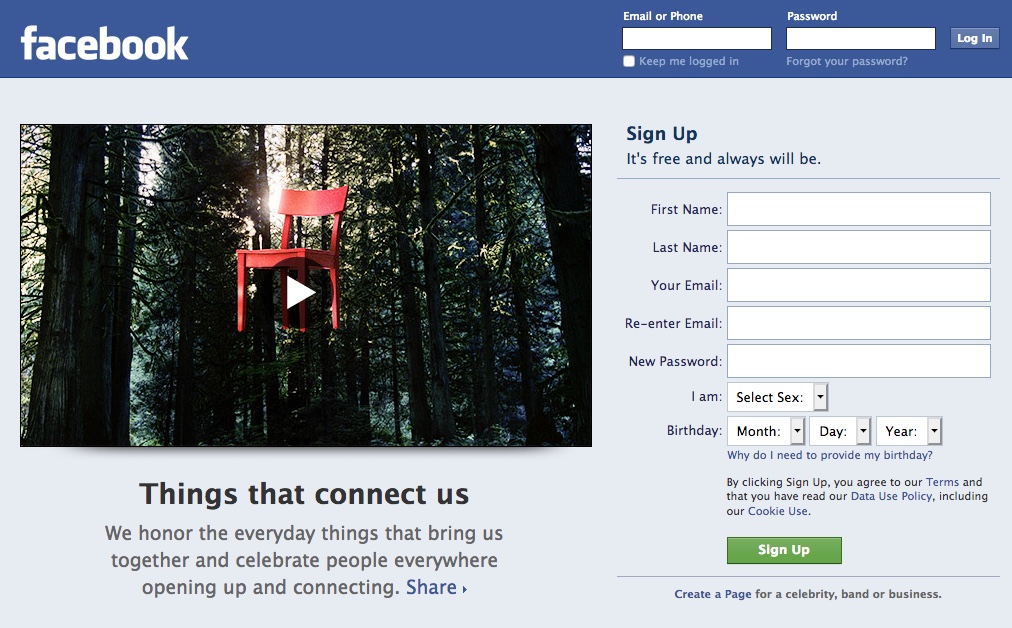
Chairs are Like Facebook Ad (2012)
Source: web.archive.org
"Litestand" Design (2013)
The design below was Facebook's bold 2013 attempt to make News Feed feel more like a visual publication. A dark vertical rail of application icons replaces the old text menu. The main story gets an enormous photograph, with Like, Comment and Share directly underneath, while secondary feeds and friend suggestions occupy a quieter column on the right. Facebook said the new look would reduce clutter and make photos, articles, maps and events larger and more colorful.
The company tested the design but did not give this exact version to everybody. Designer Dustin Curtis later wrote that people in the test appeared to spend less time outside News Feed, which he believed reduced opportunities to show ads. His account came from conversations with people he said had knowledge of the test, so treat it as an informed explanation rather than an official postmortem. Either way, the beautiful "Litestand" design became a fascinating road not taken.
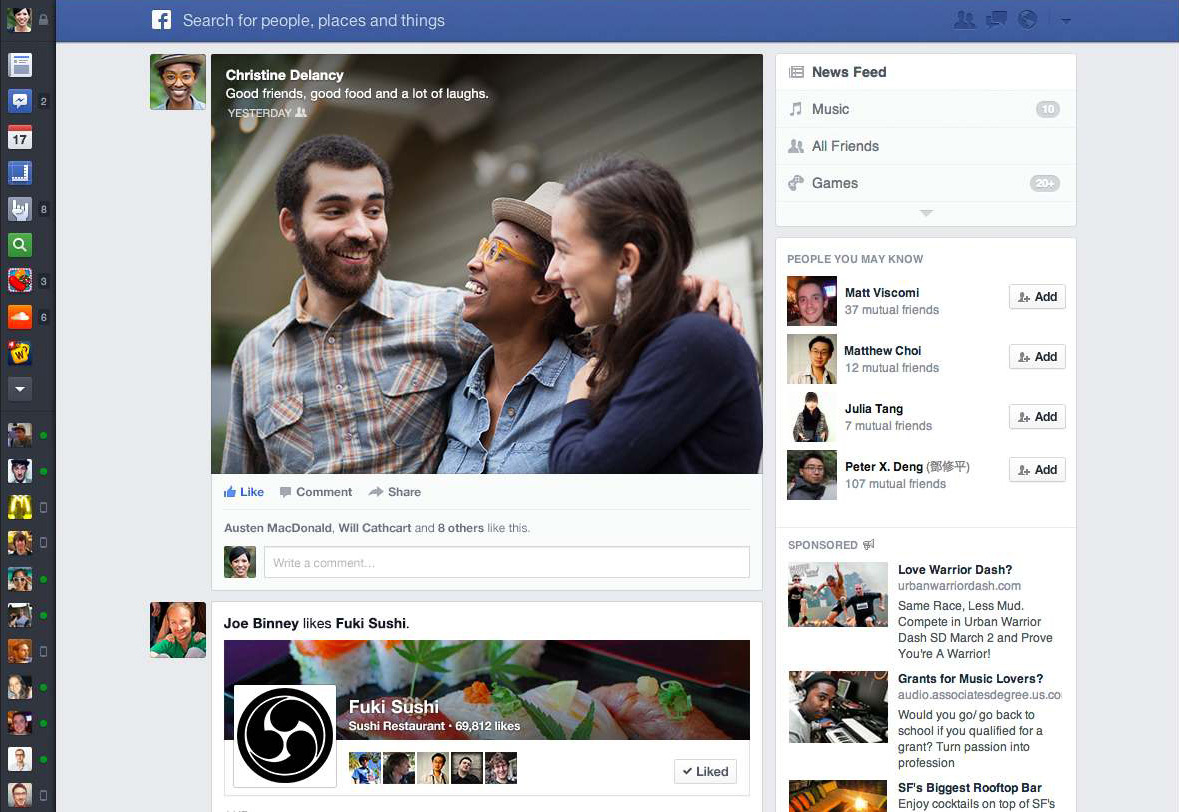
Facebook "Litestand" News Feed design (2013)
Source: dcurt.is
Timeline Moves to One Column (2013)
The profile did get a quieter redesign. Jackie's cover photograph and overlapping portrait still provide the identity, but the activity below settles into one main column. About information and friends sit in cards on the left. Status, Photo, Place and Life Event controls share a thin publisher bar over the central feed. The year index remains on the right, a little filing cabinet for jumping back through a person's life.
Compared with the 2011 Timeline, this page no longer asks the eye to zigzag between two equally important streams. It is easier to scan, and it establishes the card-based layout Facebook would refine for years.
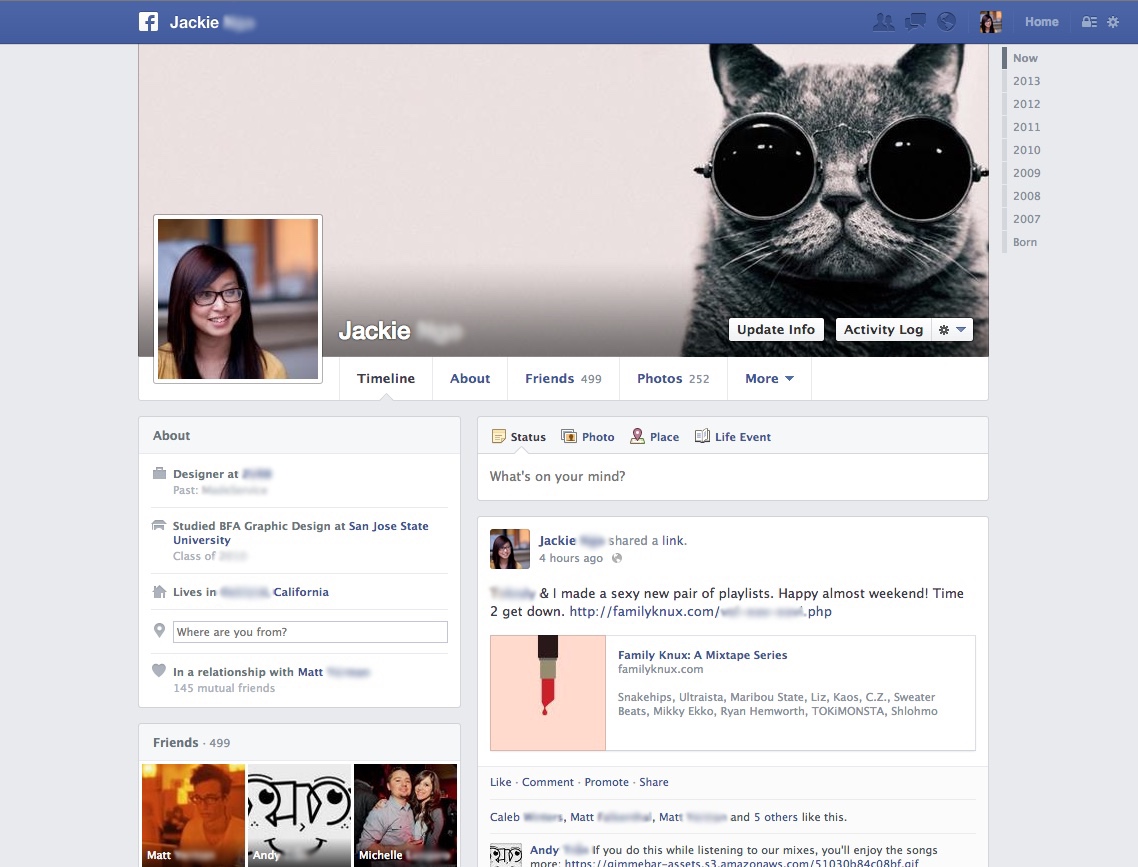
Facebook profile page (2013)
Source: patterntap.com
Profile Page (2014)
The 2014 profile keeps that structure and turns down the visual noise. The blue title bars and hard borders of early Facebook are long gone. White cards float on a pale gray field, separated mostly by space and hairline rules. A wide cover photograph leads into a single-column Timeline, with personal details and a small photo grid tucked to the left and sponsored stories on the right. The machinery has grown much more complicated, while the surface is trying hard to feel simple.
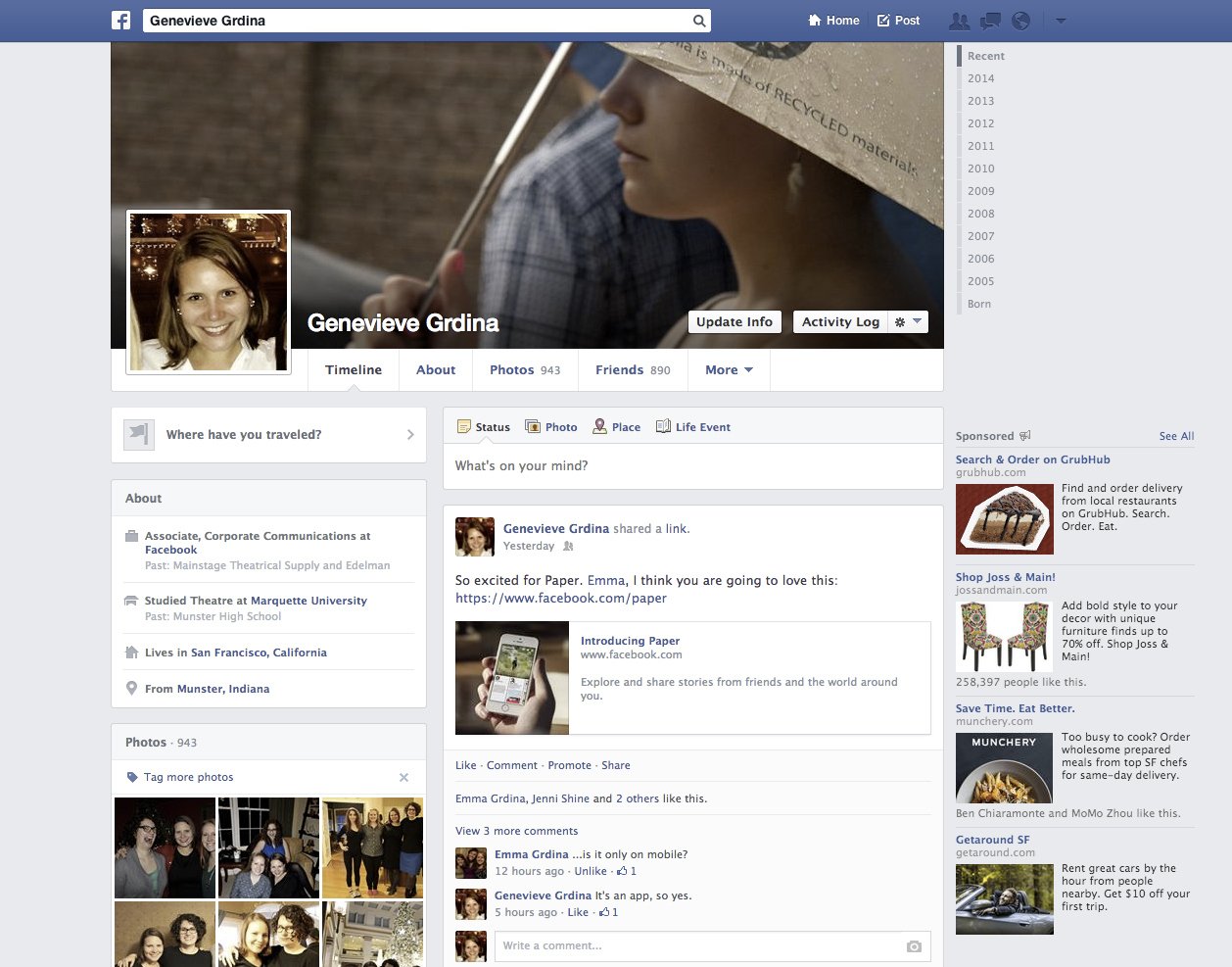
Facebook profile page (2014)
Source: time.com
New Facebook Logo (2015)
The 2015 wordmark is a subtle redesign, which is exactly why the large wordmark image is useful. Set it beside the 2005 logo further up this page and the changes resolve. The letters are wider and more open, the bowl of the a rounds out where it used to sit almost square, the c and the e unclench their apertures, and the registered trademark symbol that trailed the older lockup is gone. Blue and white stay exactly where they were. Facebook could soften the voice without surrendering recognition built over a decade.
The profile beneath it is now a dashboard running four columns at once. The cover and profile photographs establish the person at the top, biographical details and a friends grid fill the left, posts run down the center, a year index and a Sponsored slot share a narrow third strip, and the ticker and chat list occupy a fourth along the far right. The login homepage goes the other direction. It reduces Facebook to a three-part promise -- see updates, share what is new and find more of what you are looking for -- beside a registration form. The contrast is telling: simple before you join, densely connected once you are inside.

New Facebook logo (2015)
Source: facebook.com
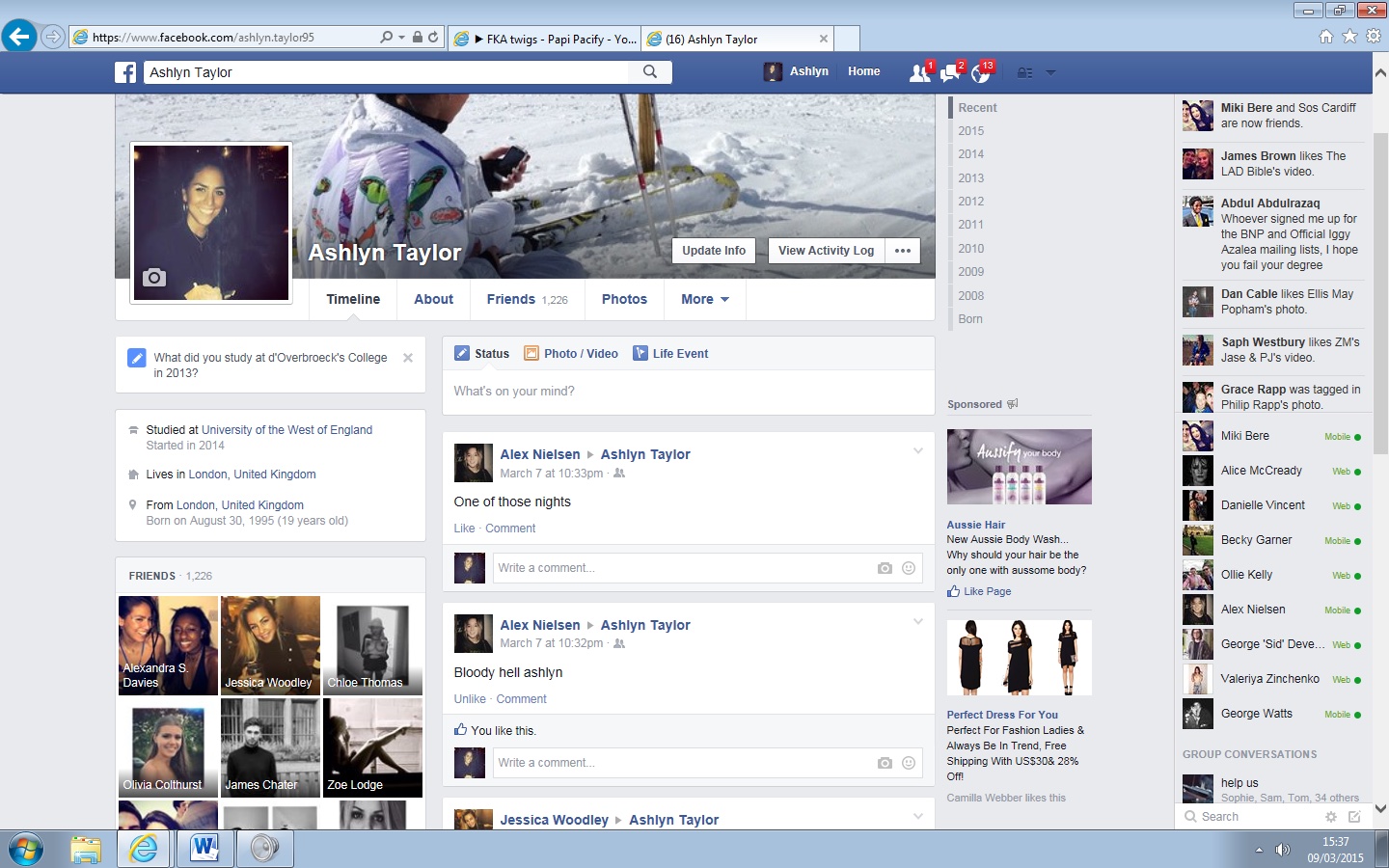
Facebook profile page (2015)
Source: ecosia.org
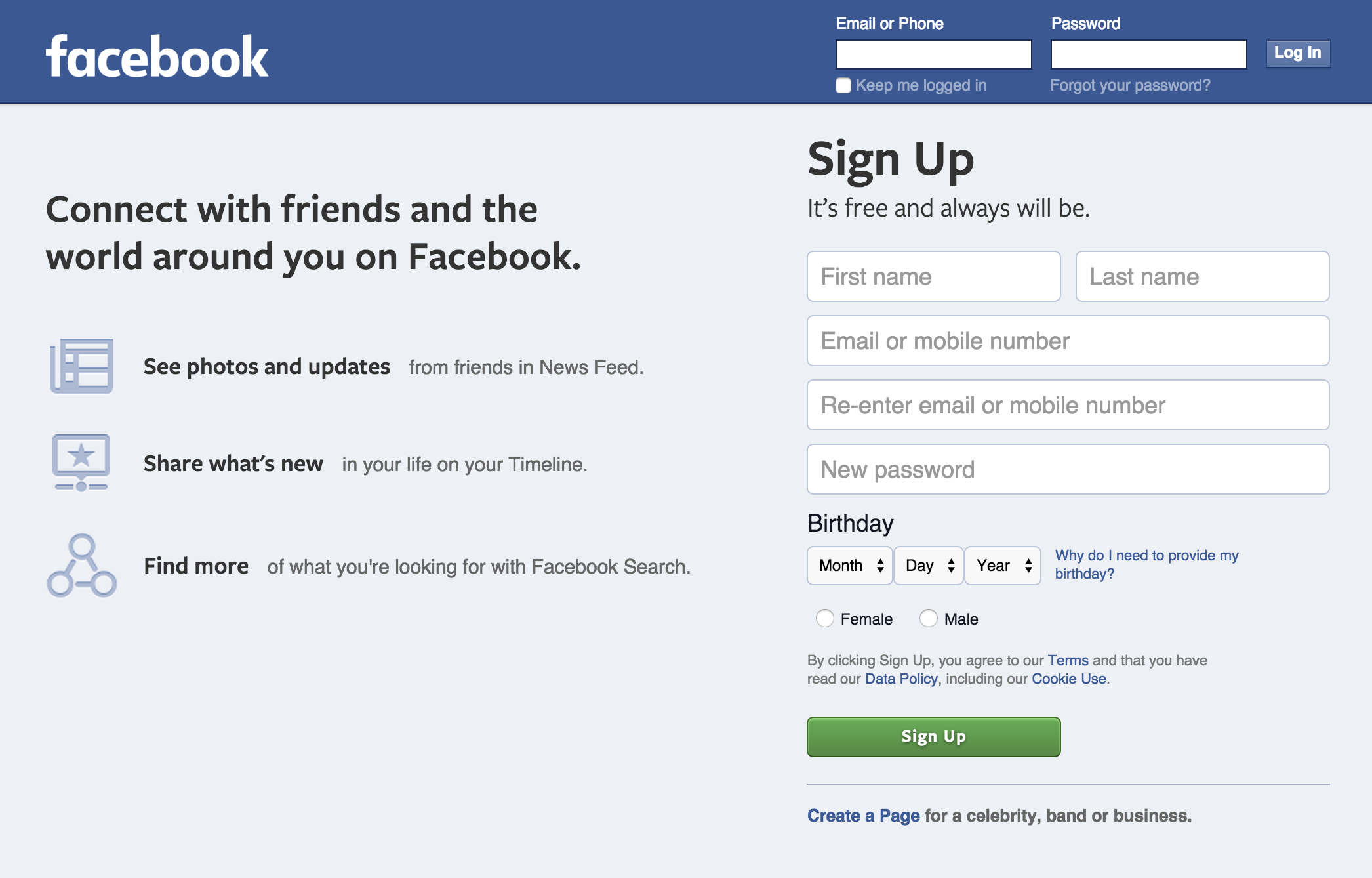
Facebook login page (2015)
Source: web.archive.org
Profile Page (2017)
The 2017 profile is narrower and more photographic. A cover image runs edge to edge across the top, the square portrait overlaps its corner and the familiar Timeline, About, Friends, Photos and More links sit directly beneath. The left column summarizes work, education, study, relationship and follower count above a grid of photos, while the main column gives most of its width to a single image post.
There is a revealing black strip above the page: this is what the profile looks like to the public, with a button to view it as a specific person. The screenshot captures both sides of Facebook's design problem in one frame. A profile has to be expressive enough to feel personal and structured enough for its owner to understand who can see it.
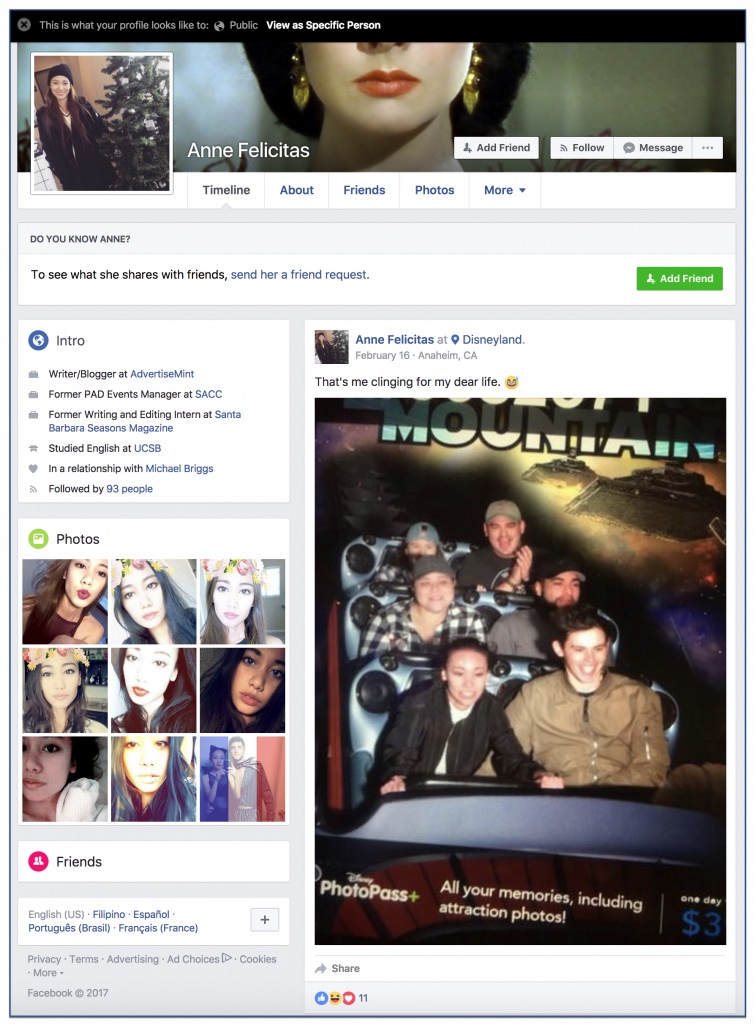
Facebook profile page (2017)
Source: advertisemint.com
Modern Facebook (2019)
The final capture is a public Page rather than an individual profile, but the family resemblance is complete. Lionel Messi's circular portrait overlaps a cinematic cover image, a blue verified badge sits beside his name and a left-side menu opens Home, About, Photos, Videos, Events, Posts and Community, plus a custom tab called Messi Choose to Believe. Like, Follow and Share buttons form a compact action bar beneath the cover, with a bright blue Use App button at the far end.
The central column is almost entirely visual, a Photos card of adidas and Cirque du Soleil promotion standing where a person's Timeline would be. On the right, a Community card counts 89,820,417 likes and 88,788,236 follows, and another card lists the Pages this Page likes: the Argentine football association, Tata Motors, Gatorade. Fifteen years after the spare Harvard directory, Facebook still organizes people around a profile and a list of connections. The difference is scale. The page now has to serve a global celebrity, millions of followers, advertisers, video and an app without losing the face at the top.
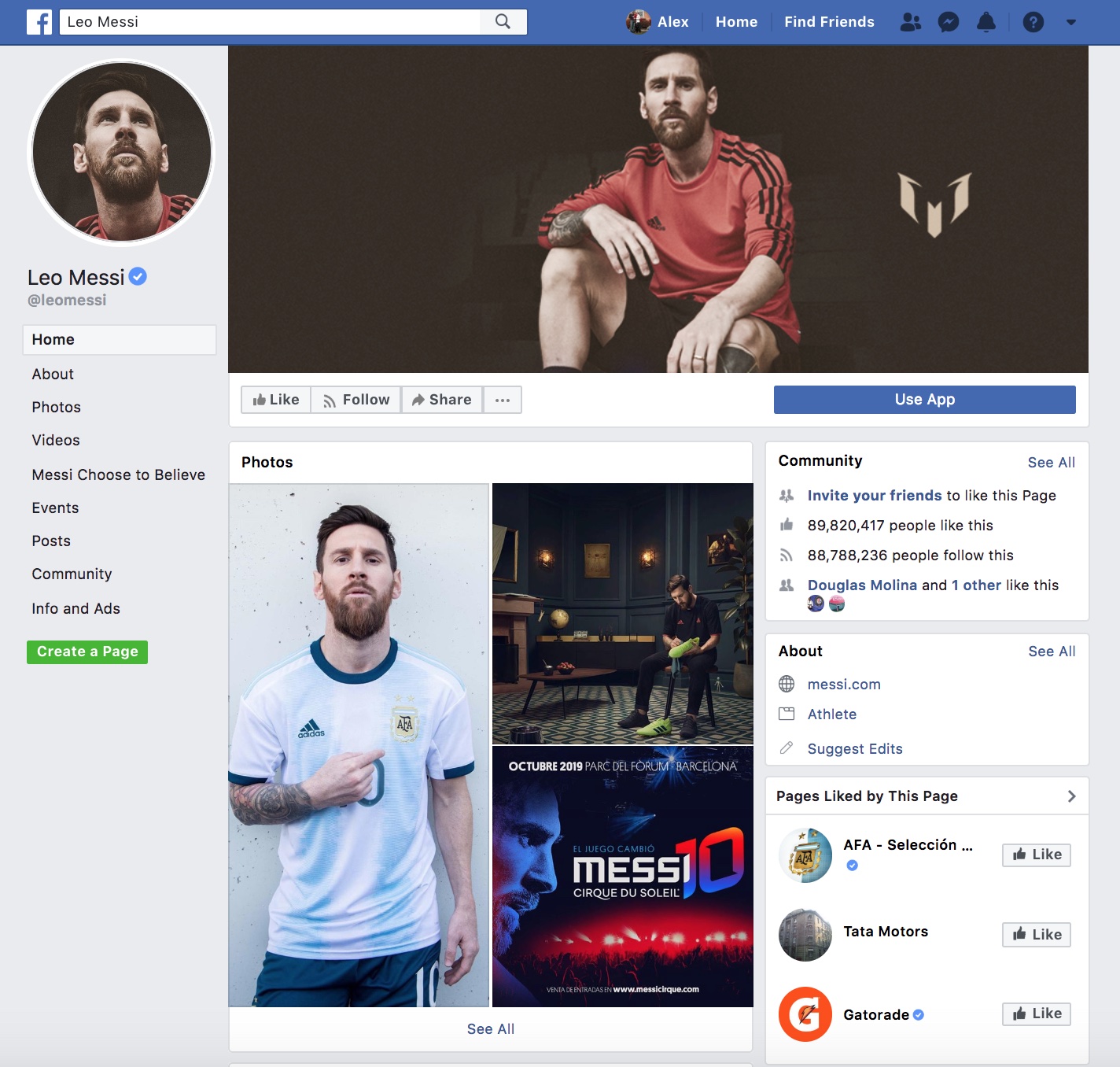
Facebook profile for Leo Messi (2019)
Source: facebook.com
More from Version Museum
 More from Version Museum
YouTube
Continue with another defining user-generated platform. View the exhibitPopular exhibits
Please help support our museum hosting costs by making a small donation -- buy us a coffee! Thank you so much!
 Buy us a coffee!
Scroll up to the top.