



The Macintosh went on sale on January 24, 1984, with 128K of memory, one 400K floppy drive, a nine-inch black-and-white screen, and software that Apple called Macintosh System Software. The Mac OS branding came later, in the mid-1990s.
Seventeen years follow, from System 1 through Mac OS 9.2.2. Watch the Control Panel as you scroll: its settings start out as pictures with almost no text, then spread into a folder holding dozens of separate controls. The screenshots include later updates within each system family, and many were captured years after the software's release.
System 1 (1984)
Two screens greeted you. First the Happy Mac, a computer smiling at you, drawn by Susan Kare along with the icons and typefaces that gave the machine its face. Then a box reading Welcome to Macintosh. Note the period.

Happy Mac startup icon (1984)
Source: uwa.edu.au

System 1 welcome screen (1984)
Source: uwa.edu.au
Here is the system disk. The window reads 227K in disk and 173K available, and the System
Folder contains Finder, System, Imagewriter, Note Pad File, Scrapbook File and Clipboard File. Some of the Mac's essential software was also built into ROM chips. The original Macintosh had no built-in hard drive; Apple's Hard Disk 20 followed in 1985. You booted from a floppy, and opening another application could mean swapping disks.
The next desktop shows several desk accessories open at once: Puzzle, Note Pad, Calculator and the
Control Panel. These small tools could stay open alongside an application. Switching between full applications became easier with Andy Hertzfeld's Switcher in 1985, followed by MultiFinder in 1987.

System 1 desktop (1984)
Source: wikipedia.org
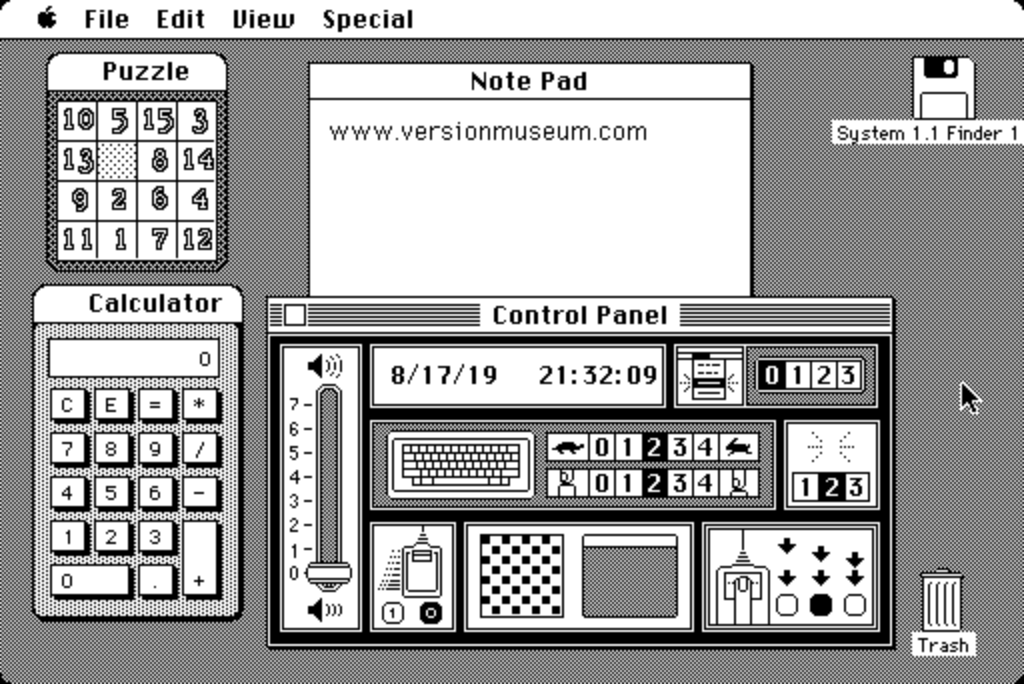
System 1.1 desk accessories (1984)
Source: Version Museum
The disk in the next shot is labeled System 1.1 Finder 1, and its System Folder lists six items, with Font
Mover and Disk Copy on the disk beside it.
Then the Control Panel, whose settings rely on pictures and numbers instead of written labels. The checkerboard is where you edit the desktop pattern
one pixel at a time; the square beside it previews the result. The rabbit and the tortoise mark the key repeat speed.
The three blinking cursors set how fast the insertion point blinks. The date
reads 8/17/19, a reminder that this is a later capture of the old software.
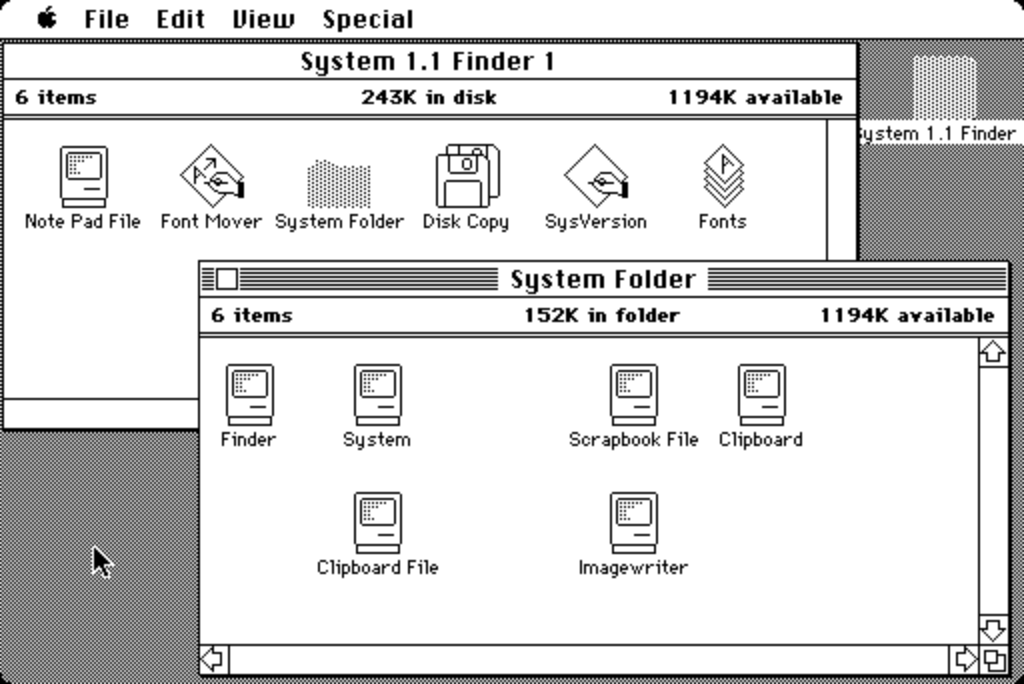
System 1.1 Finder and System Folder (1984)
Source: Version Museum

System 1.1 Control Panel (1984)
Source: Version Museum
With no protected memory, one misbehaving program could take the whole machine with it, and the Mac broke the news
with a bomb. Sorry, a system error occurred. Restart is live, Resume is grayed out, which is how it usually
went.
The Sad Mac signaled a failure during startup, which could involve hardware or system software. The hexadecimal code underneath was the clue: 0F0064, shown here, points to a problem loading the System file. Apple's service guide lists it as a bad System file.

System 1 system error bomb (1984)
Source: uwa.edu.au

Sad Mac startup error showing code 0F0064/Source: uwa.edu.au
And people played games on it, in black and white, at 512 by 342. Lode Runner brought Broderbund's ladder-and-brick puzzler over to the Mac. Airborne!, an early Silicon Beach Software game, paired its paratroopers with digitized sound: recorded gunfire and shouting out of a machine you might have expected simply to beep.

Lode Runner game (1984)
Source: archive.org

Airborne! title screen (mid-1980s)
Source: archive.org
System 3 (1986)
The welcome screen did not change. What changed sat underneath it. System 3.0 arrived alongside the Mac Plus in early 1986 with support for 800K floppy disks and the Hierarchical File System, or HFS. Introduced with Apple's Hard Disk 20 in 1985, HFS gave the Mac a true hierarchy of folders within folders.

System 3 welcome screen (1986)
Source: lowendmac.com
The window behind reads System 3.0 / Finder 5.1, a list view with Name, Size and Kind as columns. On top sits the Finder's About box, crediting two people by name: Bruce Horn and Steve Capps. Andy Hertzfeld's folklore.org collects stories from the original Mac team. This disk mixes games and utilities, with Dungeon of Doom V4.0, Duck Hunt and Bolo 0.99.6 filed next to Disk First Aid.

System 3 desktop (1986)
Source: apple.fandom.com
The System Folder lists six items, while the disk usage line reads 235K in disk. The Scrapbook in the next screenshot holds clip art you might paste into a document, and it is on page 6 of 6. Look past it at the window behind: a disk called HD20, 523K used, 19,630K free. A roughly 20MB volume held far more than a floppy, making a proper folder hierarchy much more useful.

System 3 Finder (1986)
Source: Emanon Adespoton

System 3 Scrapbook (1986)
Source: Emanon Adespoton
The Control Panel has learned to use words. Familiar settings such as key repeat and insertion point blinking now carry labels. Other controls date the machine: AppleTalk with Connected and Disconnected radio buttons, a RAM Cache showing 128K but switched off, and a Mouse Tracking control offering Mouse or Tablet.

System 3 Control Panel (1986)
Source: Emanon Adespoton
The games got ambitious. Risk redrew the board as a world map filled with different black-and-white patterns, with little soldiers along the bottom edge. Dark Castle, from Silicon Beach Software, is the one people still bring up, and its title screen argues that one bit per pixel was never really the limitation everyone assumed. The Great Hall below mixes crisp outlines with dithered shading, using patterns of black and white pixels to suggest gray, with a status bar counting SCORE, BONUS, ROCKS 60, LIVES and ELIXIR.

Risk game (1986)
Source: hampa.ch

Dark Castle title screen (1986)
Source: archive.org

Dark Castle Great Hall (1986)
Source: archive.org
System 4 and System Software 5 (1987)
Read the title bar in the first shot: System 4.2 / Finder 6.0. Apple sold that pairing in a box labeled System
Software 5.0. The package, System file and Finder had separate version numbers. There was a System Software 5, but no System file numbered 5.0. This was also the release that introduced MultiFinder.
The About box is the ancestor of a window still on your Mac. Total Memory 4,096K, Largest Unused Block 3,716K, and
two bars showing the Finder holding 160K and the System holding 220K. Later, the window becomes About
This Macintosh, which is what happens two sections down.

System 4.2 and Finder 6.0, sold as System Software 5.0 (1987)
Source: apple.fandom.com
The desktop above uses a brick pattern, and the disk holds The Hobbit and King's Quest II next to Apple HD SC Setup. The next screenshot opens a System Tools disk with a Utilities Folder, and inside that, an Installer and its script. Those tools helped put the right system files on another disk.

System 4 desktop and Finder (1987)
Source: macintoshrepository.org
The Control Panel has been taken apart. In place of one fixed window there is a scrolling list down the left
side -- General, Keyboard, Monitors, Mouse -- with additional control panel files kept in the System Folder.
Monitors is on that list because 1987 brought the Mac SE and the Mac II, the latter with expansion slots and color.
Apple could no longer assume it knew what you owned.
The shutdown screen reads like an instruction because it was one.
You may now power off the computer safely.
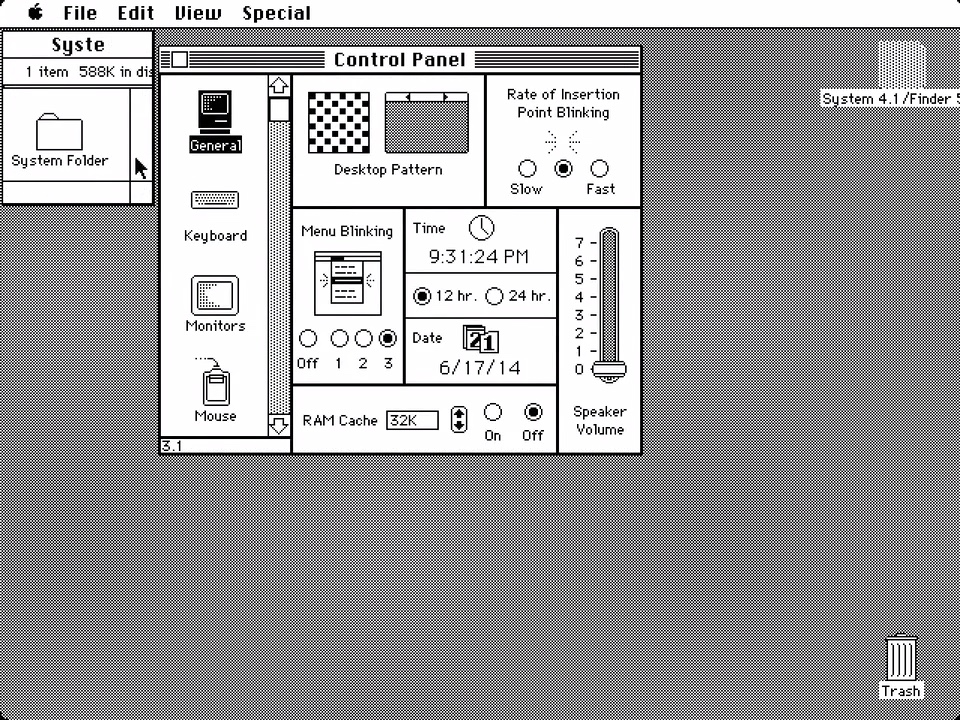
System 4 Control Panel (1987)
Source: Emanon Adespoton

System 4 shutdown screen (1987)
Source: Emanon Adespoton
Three games from this era. Apache Strike is Bill Appleton's, published by Silicon Beach, and MARK S dominates its high-score table. Spectrum HoloByte's Macintosh version of Tetris followed in 1988, with a cosmonaut down one side and a caption reading View of Earth from Salyut. And Beyond Dark Castle credits Jonathan Gay and Mark Stephen Pierce on its title screen. Gay programmed the Dark Castle games and later helped create the animation tool that became Macromedia Flash.

Apache Strike game (1987)
Source: macintoshrepository.org

Tetris for Macintosh (1988)
Source: myabandonware.com

Beyond Dark Castle title screen (copyright 1987)
Source: myabandonware.com
System 6 (1988)
System 6 arrived in 1988 and remained in use after System 7 appeared. The About box
below shows the later System 6.0.8 release from 1991 with Finder 6.1.8, despite its 1983 to 1990 copyright line. The memory bars
have picked up a running application, MacPaint 1.4 holding 384K of the machine's 4,096K total memory.
The folder titled Wikipedia is a later addition to this desktop.

System 6.0.8 with MacPaint and memory usage (1991)
Source: apple.fandom.com
Next comes a plain System Disk with a Guided Tour floppy, which helped Apple teach people what a mouse was for.
Then the Map control panel: a world map, a text field and a Find
button. Select Montréal and it displays 45°30' north, 73°36' west, a time zone five hours behind Greenwich, and a distance of 5,430
miles from the location previously set in the panel.

System 6 desktop (1988)
Source: osxdaily.com
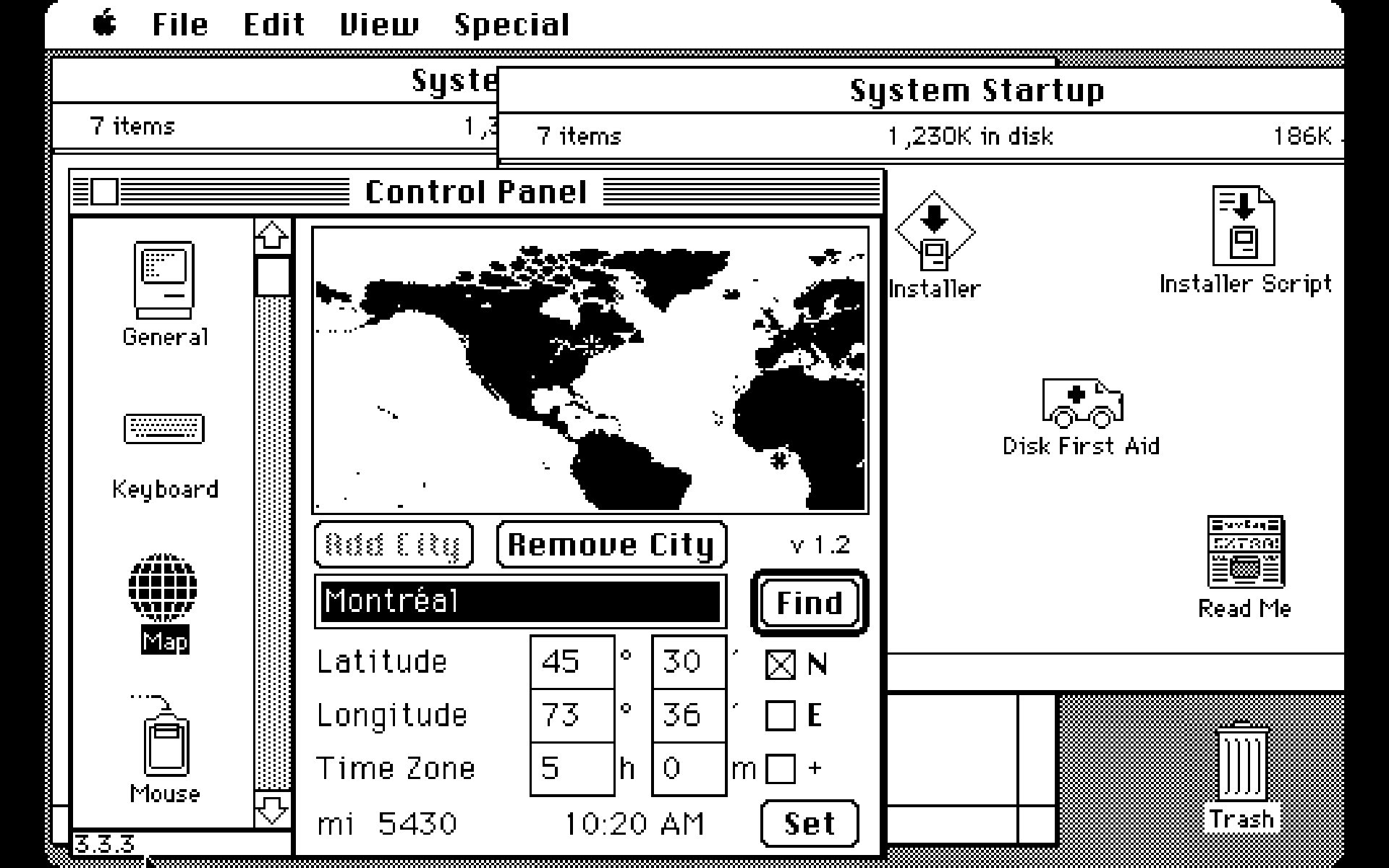
System 6 Map control panel/Source: spiria.com
Open the System Folder and the story of the era is in it.
MultiFinder is a separate file next to Finder. Introduced in 1987, it let several applications stay open and share processor time. In System 6, you could choose whether to use it at startup; Backgrounder and DA Handler helped support it. Color and Sound now have their own control panel files.
The Control Panel list in the next screenshot has a passenger:
After Dark, the third-party screensaver introduced in 1989 and later famous for its flying toasters.

System 6 Finder (1988)
Source: earlymacintosh.org

System 6 Control Panel with After Dark/Source: applefool.com
System 7 (1991)
System 7 arrived on May 13, 1991, and is the largest single
jump on this page. Aliases, virtual memory on supported Macs, built-in TrueType fonts, a Trash that kept its contents after a restart,
an Apple menu you could customize by adding items to a folder, built-in file sharing, and multitasking on all the
time rather than a mode you chose at startup.
The welcome screen, meanwhile, keeps the familiar box from 1984, now with a small color illustration.

System 7 welcome screen (1991)
Source: mac-history.net
Color had already arrived with the Macintosh II in 1987. System 7 made more use of it in the Finder, including color icons. Control Panels have become their own folder, and Puzzle now scrambles the rainbow Apple logo. Key Caps draws a live keyboard so you could hunt for characters you had no key for; the row of Apple logos is what those keys gave you in the font it had selected.

System 7.0 Control Panels, Note Pad, Puzzle and Key Caps (1991)
Source: winworldpc.com
The Chooser handled printers and network file servers: choose a driver or AppleShare on the left, then select a device or server on the right. This System 7.1 screenshot also shows the Scrapbook open on page 1 of 7, which is Apple explaining what a Scrapbook is for to someone who had never seen one.

System 7.1 Chooser, Calculator and Scrapbook (1992)
Source: winworldpc.com
This is System 7.0 on a Macintosh II with nine windows open to show it off, teal desktop and all. The disk is
in list view with disclosure triangles for expanding folders, new here, and in the middle sits About This Macintosh: a new name for that familiar memory
window, listing the system and open desk accessories.
Count the Control Panels and you get 17, three of them File Sharing Monitor, Sharing Setup and Users & Groups. A Mac on a desk could now serve files to the rest of the office.

System 7 desktop (1991)
Source: apple.fandom.com
The last of these is 7.1.1, sold as System 7 Pro in 1993. Control Panels have gained PowerTalk Setup, and on screen there is a PowerTalk Folder, a Personal Catalog and a Find in Catalog window. PowerTalk provided mail and directory services. System 7 Pro also bundled AppleScript for automating tasks.

System 7 Pro 7.1.1 desktop with PowerTalk (1993)
Source: apple.fandom.com
System 7.5 (1994)
System 7.5 arrived in 1994, but the startup screen below comes from a later update. Here is the blue face over the words Mac OS, added to the startup sequence with version 7.5.1 in 1995. The Happy Mac still appeared earlier in the boot process. Apple adopted Mac OS as the release name with version 7.6 in January 1997.
The icons marching along the bottom edge show extensions and control panels loading. These additions could slow startup, and an incompatible extension could stop the machine before it
reached the desktop.

Mac OS logo startup screen, introduced with System 7.5.1 (1995)
Source: Version Museum
This desktop is System 7.5.3 Revision 2 from 1996, and the numbers have grown. Total Memory 262,144K, which is 256 megabytes, on the descendant of a machine that shipped with 128 kilobytes. The System Folder is now a filing system of its own: Apple Menu Items, Control Panels, Extensions, Fonts, Preferences, Startup Items, Shutdown Items. MacTCP DNR, used for looking up internet domain names, is in there too. StuffIt Expander sits on the desktop below a disk named Unix.
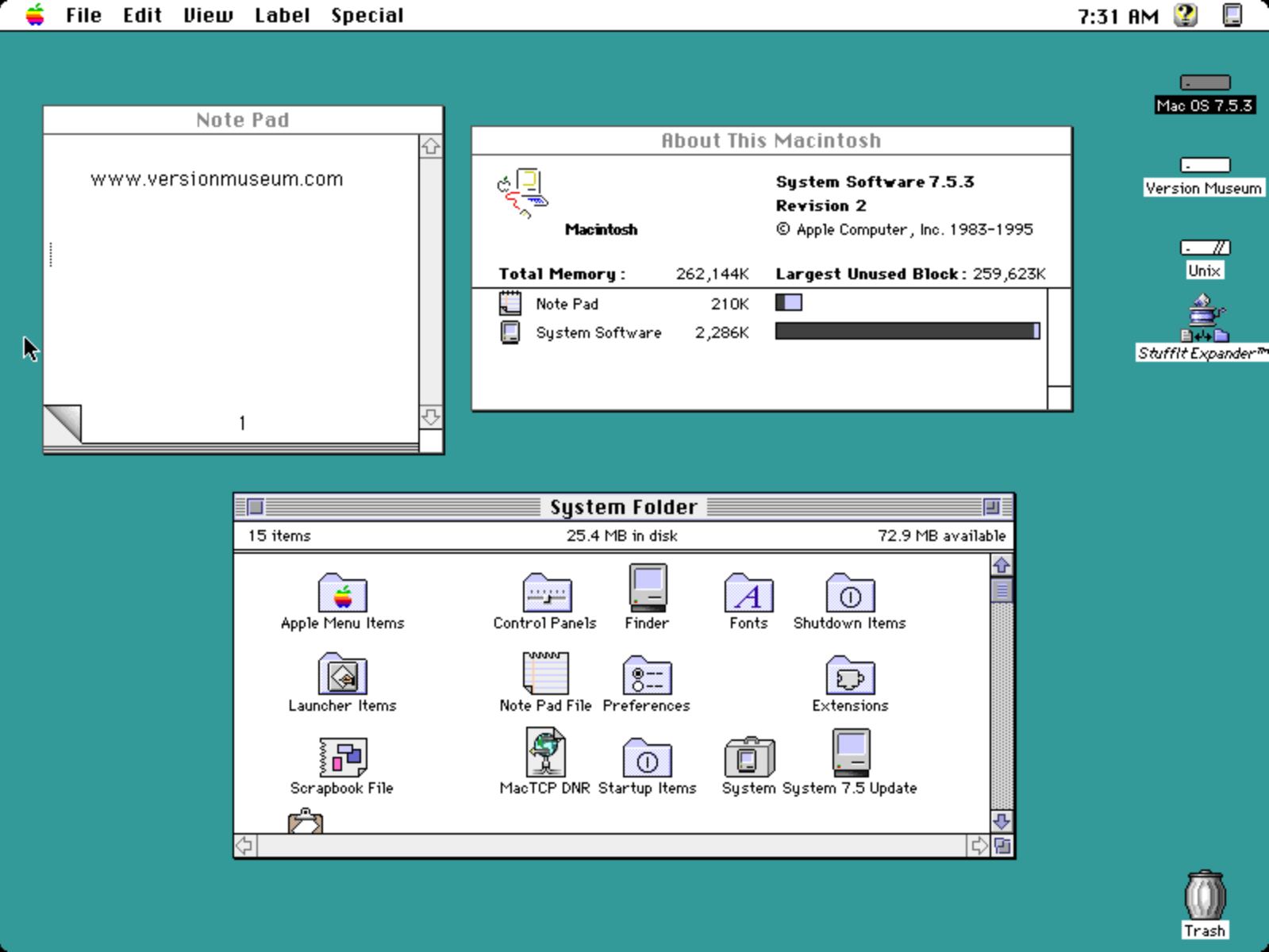
System 7.5.3 Revision 2 with About This Macintosh, System Folder and Note Pad (1996)
Source: Version Museum
Desktop Patterns offered a library of tiles in place of the old pixel editor. This installation has 74, and the selector is parked on number 66, a photograph of stones. The pattern in use behind the windows is a circuit board. Jigsaw Puzzle offers a more elaborate puzzle, and the picture it has cut apart is a relief map of the world.

System 7.5.3 Jigsaw Puzzle and Desktop Patterns (1996)
Source: Version Museum
That simple Control Panel from 1984 has grown into 42 items in this installation. The exact selection depended on the Mac and the software installed. PowerBook Display and Trackpad cater to laptops; other controls cover passwords and energy use. PC Exchange reads
DOS floppies. WindowShade rolls a window up into its own title bar. Along the bottom sits the Control Strip, a small dock of tabs for the settings people touched most.
General Controls gathers the everyday ones, including Folder Protection and a warning for when the machine was
shut down improperly. In the corner of that same window, unbothered since 1984, is Insertion
Point Blinking.
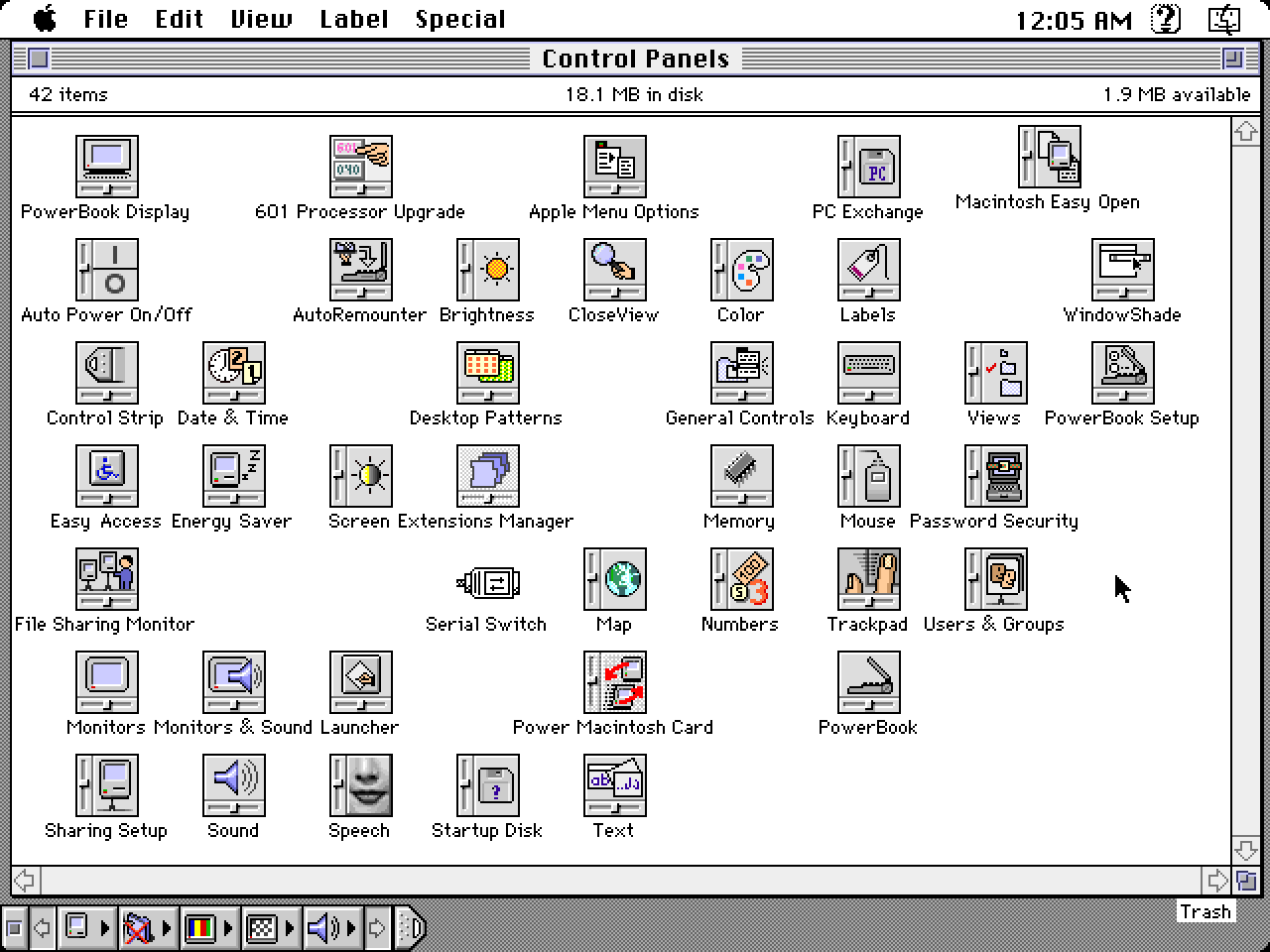
System 7.5 series Control Panels folder/Source: Version Museum

System 7.5 series General Controls/Source: Version Museum
Mac OS 8 (1997)
Mac OS 8 reached stores on July 26, 1997. Its Platinum appearance gave windows and controls a shaded, three-dimensional look, drawing on Copland, the next-generation Mac OS project that Apple canceled in 1996. Parts of Copland's interface reached customers even though the planned operating system did not. Also new: a multithreaded Finder that let you keep using Finder windows during file copies, spring-loaded folders, and contextual menus.

Mac OS 8 welcome screen (1997)
Source: winworldpc.com
The memory window is now labeled About This Computer, and its banner reads Mac OS computer over a photograph of Earth. Built-in Memory 64 MB, and the system itself is using 4.5 MB of it.

Mac OS 8 About This Computer (1997)
Source: winworldpc.com
The Control Panels folder dates itself instantly. TCP/IP, PPP, Modem and Personal Web Manager, alongside Appearance, Desktop Pictures and QuickTime Settings. Getting online was still a stack of separate pieces you configured one at a time.

Mac OS 8 Control Panels (1997)
Source: apple.fandom.com
Here is the payoff: Internet Explorer 4.01 displaying Apple.com. Internet Explorer became the Mac's default browser in this era. Read the address bar: a Wayback Machine URL for a July 1997 capture, so this is a later recreation of a browsing session. The page promotes a free BMW CD-ROM, the eMate 300, QuickTime VR footage from Mars, and a preorder for Mac OS 8 itself. We have the design history of both Apple.com and of Internet Explorer too.

Mac OS 8.1 desktop running Internet Explorer (1998)
Source: wikipedia.org
Mac OS 8.1 followed in January 1998 and added support for HFS Plus, also called Mac OS Extended. Its smaller allocation blocks reduced the space wasted by small files on large disks. Existing HFS disks still worked; upgrading the operating system did not automatically convert them. About This Computer keeps the same layout, with different version and memory figures.
The Info Center in the next screenshot is a set of HTML pages living on your hard disk, opened in a browser, with three doors:
Show Me What I Can Do, Help Me Solve a Problem, and Help Me Explore the Internet. It prints its best feature across
the middle: you did not need an internet connection to use it.

Mac OS 8.1 About This Computer (1998)
Source: toastytech.com

Mac OS 8.1 Info Center (1998)
Source: toastytech.com
The Appearance control panel is where Mac OS 8 let you push back on the gray. Accent Color offers Lavender, Lime and Magenta, previewed on the scroll bars above. Behind it, Desktop Pictures is on pattern 35 of 47, a 128 by 128 tile of rocks weighing 20K.

Mac OS 8.1 Appearance and Desktop Pictures (1998)
Source: toastytech.com
Mac OS 9 (1999)
Mac OS 9 arrived on October 23, 1999, and Apple marketed it
as the best internet operating system ever. It brought multiple user accounts, a Keychain for passwords, Software Update and Sherlock 2.
Startup still opens with a tiny Happy Mac, fifteen years after Susan Kare drew it.

Happy Mac startup icon in Mac OS 9 (1999)
Source: Shiunbird

Mac OS 9 welcome screen (1999)
Source: arpang.blogspot.com
The setup assistant walked new owners onto the internet, and this slide is a fossil. The Internet is a worldwide network of computers that you can access using your computer and a telephone line. The red circle around Continue highlights the next step. We have a whole article on the Mac OS 9 setup experience.

Mac OS 9 setup guide to the internet (1999)
Source: Shiunbird
This Apple menu has fourteen entries, with About This Computer at the top and a useful collection below: Apple System Profiler, Chooser, Control Panels, Favorites, Key Caps, Network Browser, Recent Applications, Recent Documents, Scrapbook, Sherlock 2 and Stickies. The desktop behind it is tiled with the Mac OS face.

Mac OS 9 Apple Menu (1999)
Source: wikipedia.org
Two desktops show the software people ran. The first has colorful wallpaper and a column of icons down
the right: Photoshop 5.0, iMovie,
iTunes, Entourage, and aliases to
Excel, PowerPoint and Word. The iTunes icon puts this capture in 2001 or later, since Apple introduced iTunes in January 2001.
The second comes from a 2014 article about using Mac OS 9.2.2. SimpleText holds a two-word document, a PowerPoint template offers a Company
Handbook for <XYZ Corporation>, Disk Copy waits for a disk image, and The Oregon Trail is ready to play.
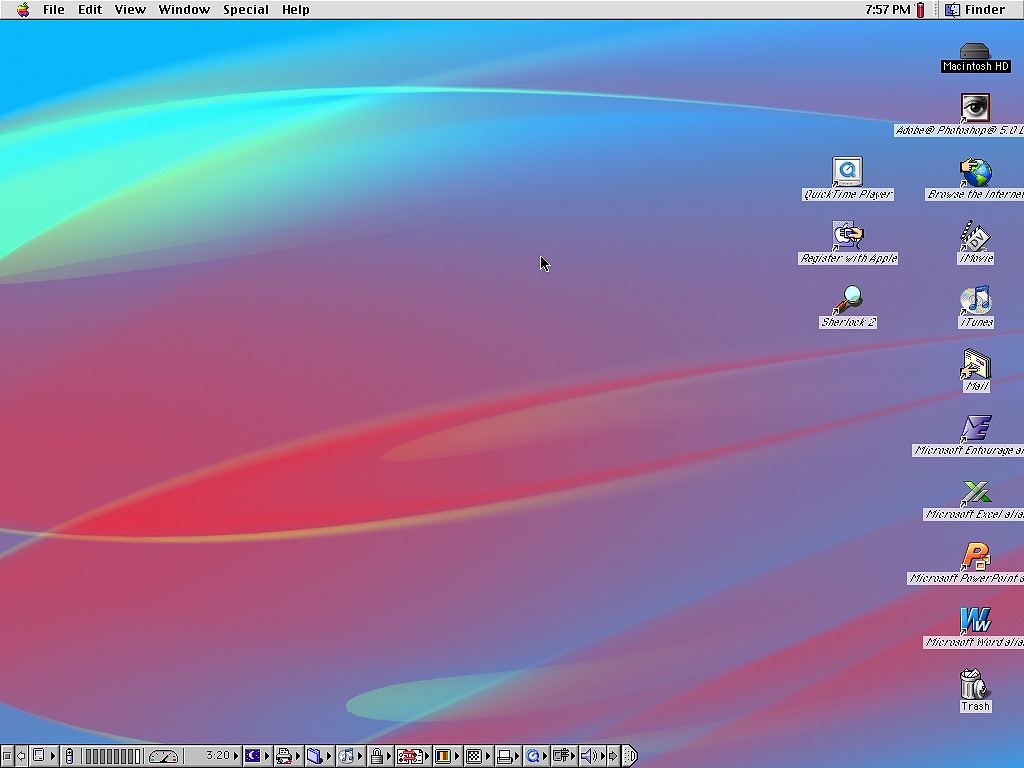
Mac OS 9 desktop with application shortcuts/Source: inetdaemon.com

Mac OS 9.2.2 desktop with applications/Source: arstechnica.com
This System Folder holds 41 items. Mac OS ROM reflects a change introduced with the iMac in 1998: on these newer Macs, much of the Mac OS Toolbox code loaded from a file into memory. Apple's technical note on the change explains that boot firmware still lived on the motherboard. Nearby are Note Pad File and Scrapbook File. Both were in the System Folder in the System 1 shots at the top of this page.

Mac OS 9 System Folder (1999)
Source: apple.fandom.com
Sherlock 2 turned searching into channels, the buttons across the top for local files and categories of internet searches. Internet channels sent queries to search services and collected their results. Here the local file channel is selected. The Index Status column reads Volume is not indexed on all three drives: searching file contents required indexing, while searching by filename did not.

Mac OS 9.2 Sherlock 2 file search (2001)
Source: winworldpc.com
The last screen here shows Mac OS 9.2.2, the final classic Mac OS release, issued in December 2001. Built-in Memory 1.50 GB. Set that
against the 4,096K in the earlier version of this window back in the System 4 section.
The bar of icons across the bottom belongs to DragThing, a shareware dock for organizing applications and other items.
Mac OS X had shipped that March with a dock of its own.
Mac OS 9 also powered the Classic environment on PowerPC Macs, letting older applications open their windows alongside Mac OS X applications. Intel Macs, introduced in 2006, did not support Classic, and Mac OS X 10.5 Leopard removed it from PowerPC Macs in 2007. Steve Jobs had already staged a mock funeral
for Mac OS 9 at WWDC in 2002. But scroll back up and count what survived those seventeen years of classic Mac OS: the menu bar, the Finder, the Trash in the corner, control panels, a window showing system information, and the setting
for how fast your cursor blinks.
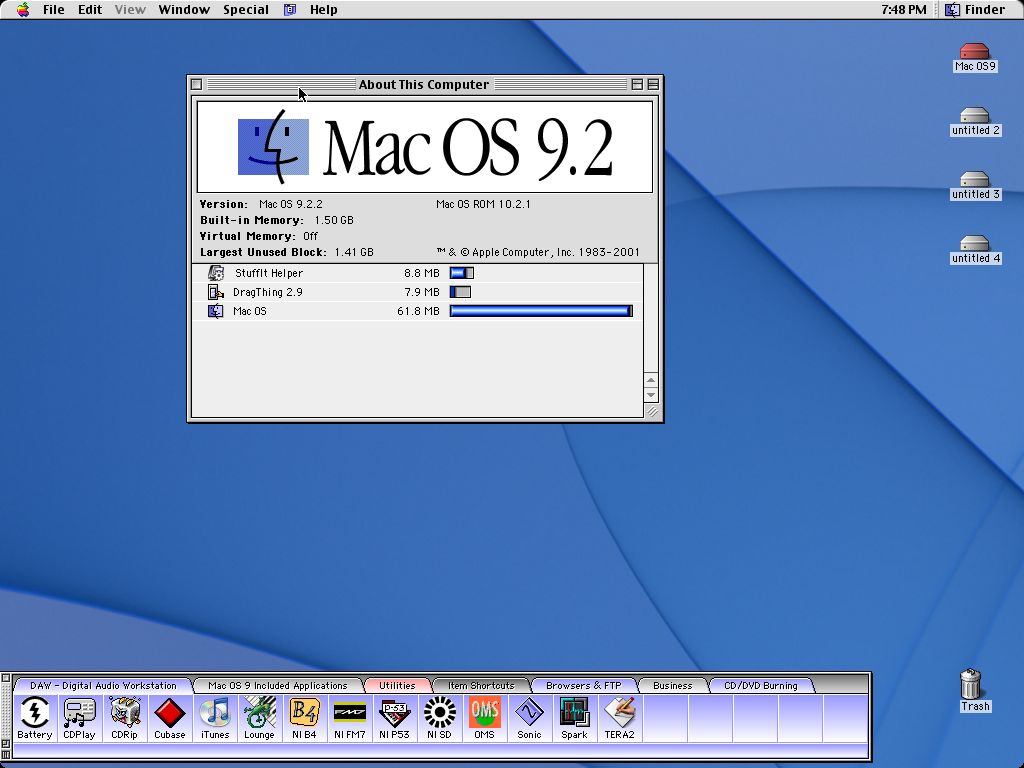
Mac OS 9.2.2 About This Computer and DragThing (2001 release)
Source: macos9lives.com
More from Version Museum
 More from Version Museum

Mac OS X
Continue with the direct successor to Classic Mac OS. View the exhibitPopular exhibits
Please help support our museum hosting costs by making a small donation -- buy us a coffee! Thank you so much!
 Buy us a coffee!
Scroll up to the top.